• CSS_规则

    字体样式

    font-family:字体组(显示的什么字体)

    font-size: 字体的大小

    font-weight:字体的粗细

    font-style:字体样式

    line-height:行高并且具有居中效果

    font速写方式记忆方式:当你第一眼看到字的时候,应该是先看到字是否斜还是正的,然后接着看字体的粗细,字体的大小、行间距,最后最后观察这个是什么字体

    文字样式

    color:字体的颜色

    text-align: 字体的摆放位置

    text-decoration: 装饰字体

    含义 代码
    字体的装饰线 text-decoration-line
    字体装饰线的样式 text-decoration-style
    字体的颜色(通常是改变a标签内的字体颜色) text-deccoration-color

    text-indent: 字体缩进

    text-shadow: 字体阴影

    写法:离左边多远 离上方多远 模糊程度 什么颜色的阴影

    列表样式

    list-style

    含义 代码
    小点点的样式 list-style-type
    小点点的图片 list-style-image
    小点点是在padding外面还是在padding里面 list-style-position

    盒子样式

    width:宽度

    height:高度

    margin:外边距

    border:边框样式

    含义 代码
    边框颜色 border-color
    边框样式 border-style
    边框宽度 border-width

    box-shadow:边框阴影

    写法:离左边多远 离上方多远 模糊程度 什么颜色的阴影

    box-radius: 边框曲度

    background: 背景样式

    含义 代码
    背景铺设的起点 background-origin
    背景图片 background-image
    背景图片是否重复 background-repeat
    背景颜色 background-color
    背景位置 background-position
    背景裁切位置 background-clip

    padding:内边距

  • CSS课堂梳理

    介绍

    1.层叠样式

    2.层叠

    • 多个样式表修饰同一个元素
    • 继承
    • 优先级

    3.样式表

    1
    2
    3
    {
    color:#fff;
    }

    在HTML中的用法

    1.内嵌样式表:在元素中添加style属性,style属性值为CSS样式规则

    <div style="width: 100px; height: 100px;"></div>

    缺点:样式与结构杂糅
    优点:简单直接,优先级高

    2.内部样式法:将样式添加到head标签中的style标签里

    1
    2
    3
    <style>

    </style>

    3.外部样式法:将样式定义在CSS文件中,通过<link rel="stylesheet" href="./CSS文件名.CSS">连接


    语法

    1
    2
    3
    4
    5
    选择器{
    样式名:样式值;
    样式名:样式值;
    ...
    }

    选择器

    选择器的类别

    1. 核心选择器
    2. 层次选择器
    3. 属性选择器
    4. 伪类选择器
    5. 伪元素

    核心选择器

    选择器 代码
    标签选择器 div{}
    id选择器 #one{}
    class选择器 .second{}
    逗号选择器 div,#one{}、ul,ol{}
    组合选择器 div#one{}
    普遍选择器 *

    层次选择器

    选择器 代码格式
    子元素选择器 nav > ul > li{}
    后代选择器 .nav li{}
    下一代兄弟选择器 .products > li.ios +*{}
    之后所有兄弟选择器 .products > li.ios ~*{}

    属性选择器

    作用:过滤(表单元素)

    选择器 含义
    selector{} 选择某个标签
    input[placeholder] 选择在input中具有placeholder的元素
    input[type=text] 选择在input中type为text的元素
    input[type^=t] 选择以input中type的值以t开头的元素
    input[type$=t] 选择以input中type的值以t结尾的元素
    input[type*=t] 选择以input中type的值含有t的元素

    伪类选择器

    作用:过滤器

    1.与状态有关

    选择器 含义
    :link a标签还未被访问
    :hover 光标悬浮到元素上
    :active a标签激活
    :visited a标签访问过

    2.与子元素有关

    选择器 含义
    :first-child 选择第一个子元素
    :last-child 选择最后一个子元素
    :nth-child(v) 选择第v个子元素
    :first-of-type 选择第一种类型的子元素
    :last-of-type 选择最后一中类型的子元素
    :ntc-of-type(n) 选择同类型中的第n个同级兄弟元素

    伪元素

    选择器 含义
    ::after 选择子元素最后的位置
    ::before 选择子元素最前面的位置
    ::first-letter 选择第一个字符
    ::first-line 选择第一段字符
    ::selection 选择被选中的文字
  • 关于表单的介绍及一些用法

    表单的作用:前后台交互

    用户通过表单传递数据到后台,然后后台把数据库存储到数据库中,最后再在需要的时候提取数据


    form

    form 拥有 actionmethodenctype 这三个属性

    • action: 后台接口地址,通过这个属性来将当前页面的数据以及链接连接到action中所链接的网页,对于数据的传递以及页面的跳转相当重要

    • method: 决定当前页面对于action中所链接的网页请求方式是post还是get

      • get: 参数拼接在URL后面,通过?来分割(传递参数较少)

        用途举例:查询学生信息,通过id删除学生信息

      • post: 参数放在请求体中,安全(传递参数更多)

        用途举例:保存或者更新学生信息,批量删除

    • enctype: 编码方式(浏览器怎么上传数据或者是怎么样转换参数)

    • application/x-www-form-urlencoded: 浏览器会将参数转换为【查询字符串qs】格式

    • multiparty/form-data: 当有附件在表单中的时候,enctype务必要设置为这种格式

    input

    input 具有 namevaluetypecheckedplaceholder

    • name: 不能省略,作为参数中的key

    • value: 作为参数中的value,在按钮中务必指定value值

    • type: input的样式,具有下面几种样式,(H5 又拓展了几个属性比如 email (邮箱), data (日期), number , progress (进度条)等等,现在可能兼容性不太好)

      • text: 文本框

      • password: 密码框

      • submit: 提交按钮

      • file: 附件选择器

      • redio: 单选按钮

      • checkbox: 复选按钮

    • checked: 单值属性,默选地址

    • placeholder: 提示语

    select下拉框

    标签中的文本显示在网页中,提交的值应该是optionvalue值,当这个值没有设定的时候,提交的是标签中的文本

    <option value="sx">山西</option>

    上面的代码提交的就是sx

    <option>山西</option>

    上面的代码提交的是山西

    textarea: 多行文本域也具有placeholder提示语

    举例代码

    1
    2
    3
    4
    5
    6
    7
    8
    9
    10
    11
    12
    13
    14
    15
    16
    17
    18
    19
    20
    21
    22
    23
    24
    25
    26
    27
    28
    29
    30
    31
    32
    33
    34
    35
    36
    37
    38
    39
    40
    41
    42
    43
    44
    45
    46
    47
    48
    49
    50
    51
    52
    53
    54
    55
    56
    57
    58
    59
    60
    61
    62
    63
    64
    65
    66
    67
    68
    69
    70
    71
    72
    73
    74
    75
    76
    77
    78
    79
    80
    81
    82
    83
    84
    85
    86
    87
    88
    89
    90
    91
    92
    93
    94
    95
    96
    97
    98
    99
    100
    101
    102
    103
    104
    105
    106
    107
    108
    109
    110
    111
    112
    113
    114
    115
    116
    117
    118
    119
    120
    121
    122
    123
    124
    125
    126
    127
    <!DOCTYPE html>
    <html lang="en">
    <head>
    <meta charset="UTF-8">
    <title>表单</title>
    </head>
    <body>
    <!-- http://134.175.154.93:8099/manager/user/saveOrUpdateUser -->
    <center>
    <form action="http://134.175.154.93:8099/manager/user/saveOrUpdateUser" method="GET">
    <table border="1" cellspacing="0" class="tbl">
    <tbody>

    <!--用户名-->
    <tr align="center">
    <td>用户名</td>
    <td><input type="text" name="username"></td>
    </tr>

    <!--密码-->
    <tr align="center">
    <td>密码</td>
    <td><input type="password" name="password"></td>
    </tr>

    <!-- 真实姓名 -->
    <tr align="center">
    <td>真实姓名</td>
    <td><input type="text" name="nickname"></td>
    </tr>

    <!--email-->
    <tr align="center">
    <td>email</td>
    <td><input type="text" name="email"></td>
    </tr>

    <!-- 出生日期 -->
    <tr align="center">
    <td>出生日期</td>
    <td><input type="date" name="bir"></td>
    </tr>

    <!-- 性别 -->
    <tr align="center">
    <td>性别</td>
    <td>
    <label for="man">
    <input type="radio" name="sex" value="男" id="man" checked>&nbsp;
    </label>
    <label for="woman">
    <input type="radio" name="sex" value="女" id="woman"></td>
    </label>

    </tr>

    <!-- 爱好 -->
    <tr align="center">
    <td>爱好</td>
    <td>
    <label>
    <input type="checkbox" name="hobby" value="basketball">篮球 &nbsp;
    </label>
    <label>
    <input type="checkbox" name="hobby" value="football">足球 &nbsp;
    </label>
    <label>
    <input type="checkbox" name="hobby" value="reading">阅读
    </label>
    </td>
    </tr>

    <!-- 地址 -->
    <tr align="center">
    <td>地址</td>
    <td>
    <select name="province">
    <option value="jiangsu">江苏</option>
    <option value="shanxi">山西</option>
    <option value="hunan">湖南</option>
    <option value="gansu">甘肃</option>
    </select>


    <select name="city">
    <option value="suzhou">苏州</option>
    <option value="nanjing">南京</option>
    <option value="zhenjiang">镇江</option>
    <option value="huaian">淮安</option>
    </select>

    </td>
    </tr>

    <!-- 个人介绍 -->
    <tr>
    <td>介绍</td>
    <td><textarea name="description" cols="30" rows="10" placeholder="请编写个人介绍"></textarea></td>
    </tr>

    <!-- 注册按钮 -->
    <tr align="center">
    <td colspan="2"><input type="submit" value="注册"></td>
    </tr>

    </tbody>
    </table>
    </form>

    <br>
    <hr>
    <br>

    <form action="http://134.175.154.93:8099/manager/file/upload" method="post">
    <table border="1" cellspacing="0">
    <tbody>
    <tr>
    <td><input type="file" name="file"></td>
    <td><input type="submit" name="shangchuan" value="上传"></td>
    </tr>
    </tbody>
    </table>
    </form>

    </center>
    </body>
    </html>

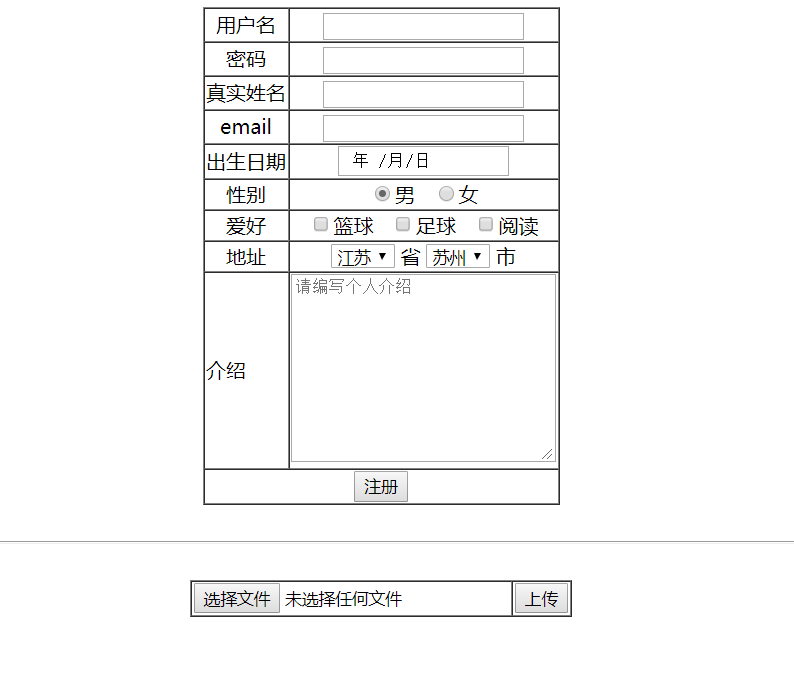
    举例代码运行结果

  • 关于前端三要素及其内容

    前端三要素

    js: 主要负责页面与用户的交互

    CSS: 主要负责页面的样式,是否美观

    HTML: 页面的主要框架

    HTML属性

    核心属性:绝大多数标签都可以应用的属性

    • id: 文档内部的唯一标识

    • class: 类

    • title: 描述

    • style: 样式,取值为css规则

    特有属性

    a

    img

    H5拓展属性

    data-xxx

    HTML元素

    1. 块元素

    作用: 作为页面框架,或者容器,是页面的主体

    特性

    1. 独占一行

    2. 默认宽度为100%

    3. 可以为其指定宽高,style=“width:; height:;”

    常见的块元素

    • div: 无意义的块元素

    • h1~h3: 标题

    • p: 段落

    • html: 主体

    • ul、li: 无序列表、列表项

    • ol、li: 有序列表、列表项

    2. 行内元素

    作用: 点缀网页,填充内容

    特性

    1. 与其他行内元素共享

    2. 默认宽高有内容决定

    3. 不能为其指定宽和高

    4. 行内元素中不可以嵌套块元素,但块元素中可以嵌套行内元素

    常见的行内元素

    • span: 无意义的行内元素

    • a: 超级链接

    • img: 图片

    功能元素

    1. 表格(table)

    2. 表单

  • 关于hexo的一些基础语法及用法

    打开hexo服务器:hexo s

    更新hexo文件:hexo g

    把文件部署到服务器上(一般配合 hexo g使用):hexo d

    清理hexo文件(一般配合 hexo g 和 hexo d 使用):hexo clean

    创建博客文章文件: hexo new “文章名”


    之后有接触再补充

  • 怎么样创建博客(简单方式)

    step1:先在 https://nodejs.org 中下载nodejs,安装好以后在cmd中输入 node -v 看看node是否已经安装完毕


    step2:用管理员模式打开cmd,接着在cmd中输入 npm install -g cnpm –registry=https://registry.npm.taobao.org


    step3: 在cmd中继续输入 cnpm install -g hexo-cli


    step4: 在随便一个盘(最好不要在C盘中创建)中创建一个叫做Blog的文件夹


    step5: 在cmd中进入该文件夹,然后在输入 hexo init


    step6:到了这一步已经可以看你的博客最初模样了,在cmd中输入 hexo S,然后在浏览器中进入 localhost:4000,现在你就可以看到hexo为你创建的博客原型了


    step7:接着在cmd中输入 hexo clean 清理一下hexo,然后输入 hexo g 创建博客网页


    step8: 在cmd中输入 cnpm install –save hexo-deployer-git


    step9:在github中创建一个账号,并且创建一个空仓库,记住仓库的HTTPS


    step10:在cmd中输入 hexo d,接下来cmd中就会提示让你输入你的github的邮箱以及密码,输入完以后再 hexo d


    step11:接下来你就可以去网页看到你的博客了