• Vite使用mockjs

    1. 安装mockjs

    1
    2
    3
    pnpm add mockjs@1.0.0

    pnpm add @types/mockjs -D

    2. 安装vite-plugin-mock

    1
    pnpm add vite-plugin-mock@2.9.6 -D

    3. vite.config.ts

    1
    2
    3
    4
    5
    6
    7
    8
    9
    10
    11
    import { viteMockServe } from 'vite-plugin-mock'

    viteMockServe({
    localEnabled: true,
    prodEnabled: true,
    mockPath: 'mock',
    injectCode: `
    import { setupProdMockServer } from './plugins/mockProdServer'
    setupProdMockServer()
    `,
    }),

    4. 在plugins中加入 mockProdServer.ts

    1
    2
    3
    4
    5
    6
    7
    8
    9
    10
    11
    12
    13
    import { createProdMockServer } from 'vite-plugin-mock/es/createProdMockServer'

    const modules = import.meta.glob('../../mock/*.mock.ts', { eager: true })

    const apiList: any[] = []

    Object.values(modules).forEach((module: any) => {
    apiList.push(...module.default)
    })

    export function setupProdMockServer() {
    createProdMockServer([...apiList])
    }
  • git设置、查看、取消代理

    设置代理:前提你得有代理哈

    设置代理:

    1
    2
    3
    4
    5
    6
    7
    //http || https
    git config --global http.proxy 127.0.0.1:7890
    git config --global https.proxy 127.0.0.1:7890

    //sock5代理
    git config --global http.proxy socks5 127.0.0.1:7891
    git config --global https.proxy socks5 127.0.0.1:7891

    查看代理:

    1
    2
    git config --global --get http.proxy
    git config --global --get https.proxy

    取消代理:

    1
    2
    git config --global --unset http.proxy
    git config --global --unset https.proxy
  • 如何在国内访问vercel部署应用?

    1. 将腾讯云域名DNS解析转移到Cloudflare进行

    1.1 准备一个自己的域名

    既然是要代理到原来的域名,所以得准备一个自己在国内服务商购买的域名。具体的流程应该都清楚的吧也就不多说了,在腾讯云里面你只用登录控制台然后搜“域名注册”四个字就会提示你怎么操作了。唯一的要求就是你要付钱,我建议便宜点就行。

    1.2 登录Cloudflare控制台并添加站点

    前往https://www.cloudflare.com/zh-cn进行注册,有账号的直接登录。

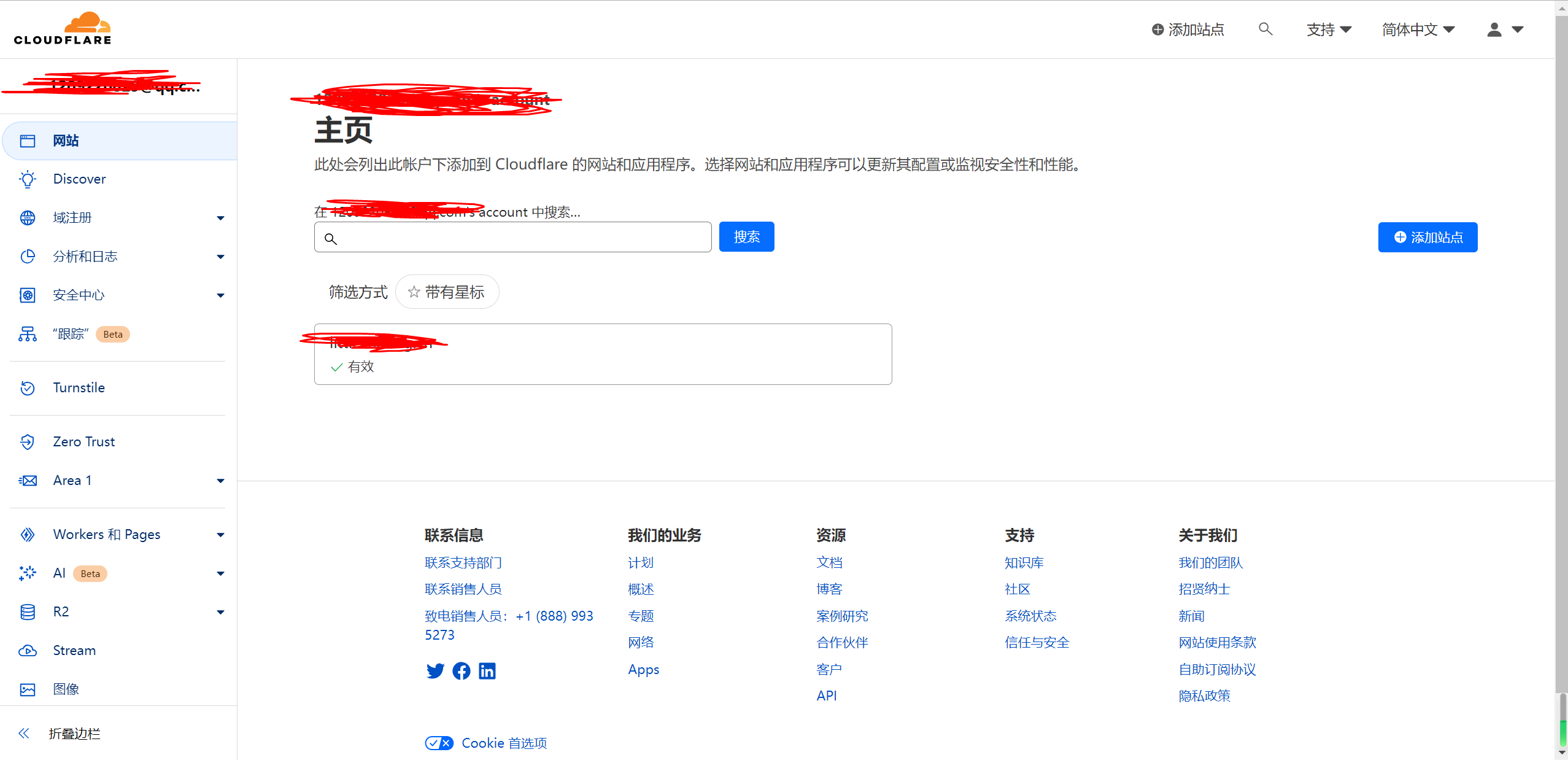
    进来之后看到如下页面,我之前加过一个站点所以会弹出来,没有的就可以不用管:

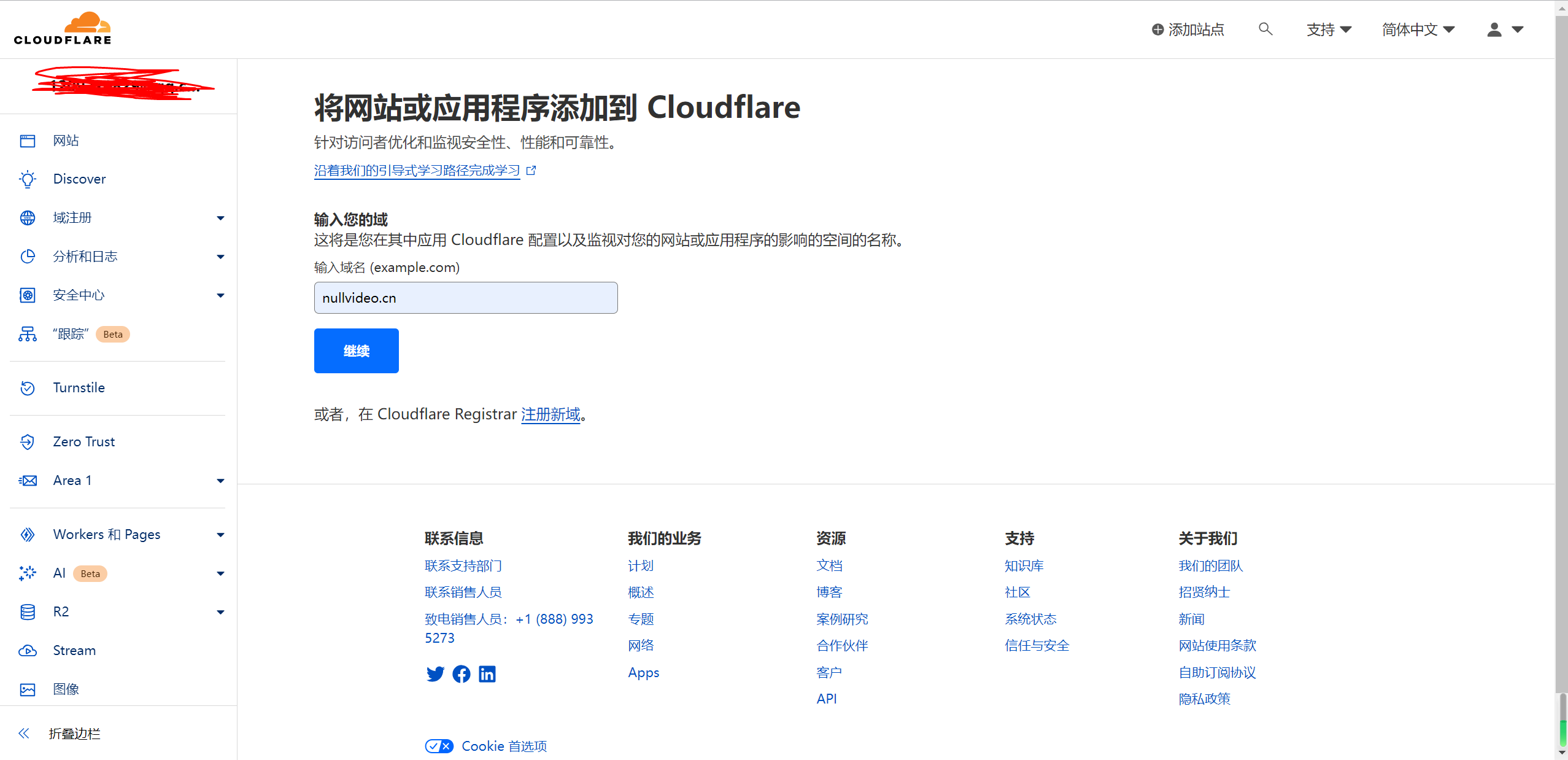
    然后点击右侧的这个添加站点就好了,进入下一步,输入你要加的域名(就是你之前在腾讯云上面买好的)然后点击继续:

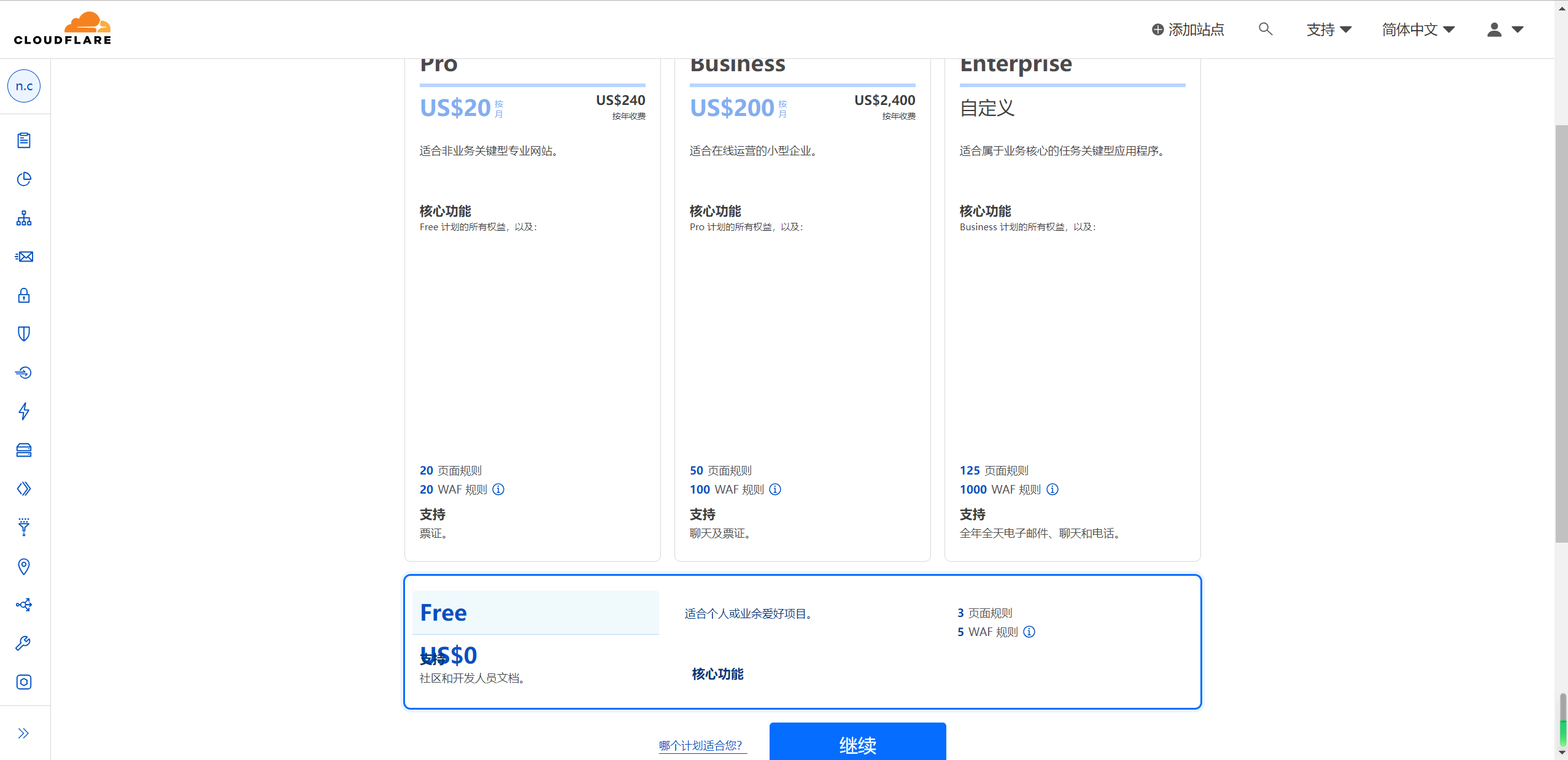
    然后选择计划,一般无特殊需求直接白嫖然后点击继续:

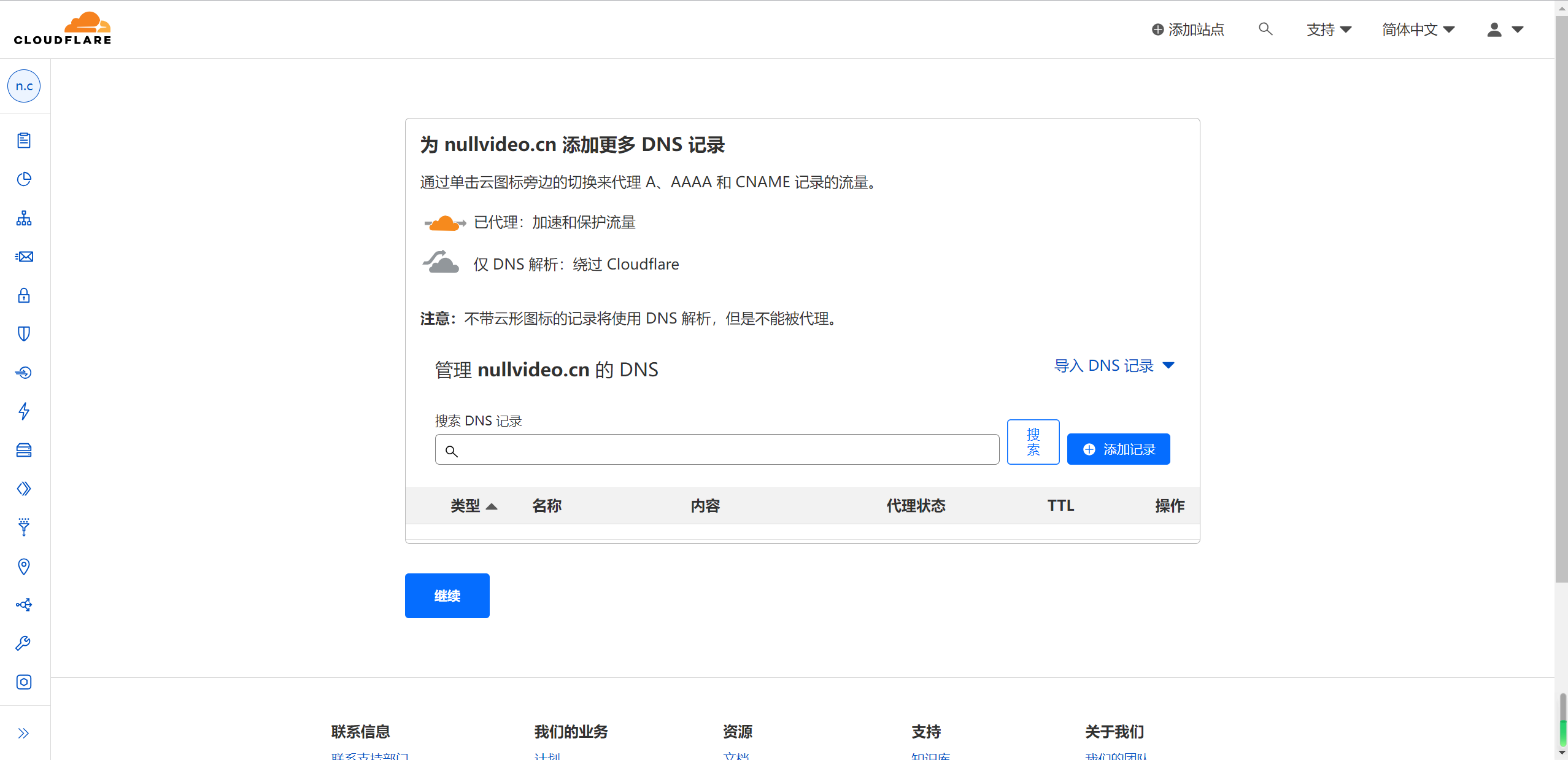
    接下来 Cloudflare 会自动扫描你的部分dns记录。我这个域名是刚刚买的还没有进行一些解析的操作,所以是没有记录的。点击继续:

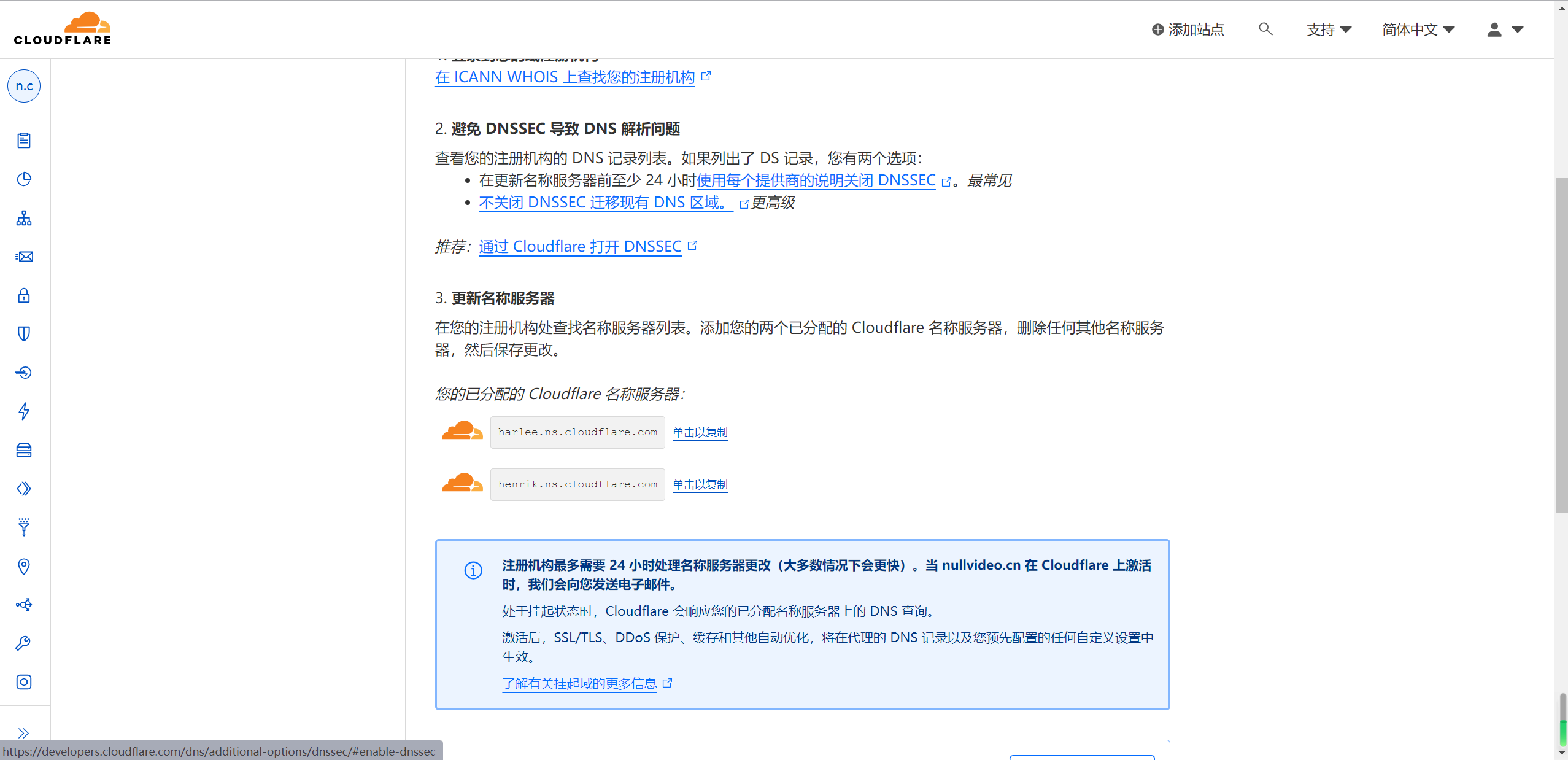
    然后最关键的点来了,Cloudflare会自动生成两条dns地址,就是下面两个云右边的字符串,你得拿着这两个地址去换掉腾讯云原本的解析:

    至此,Cloudflare部分的工作告一段落。

    1.3 在腾讯云域名管理控制台更改DNS服务器解析

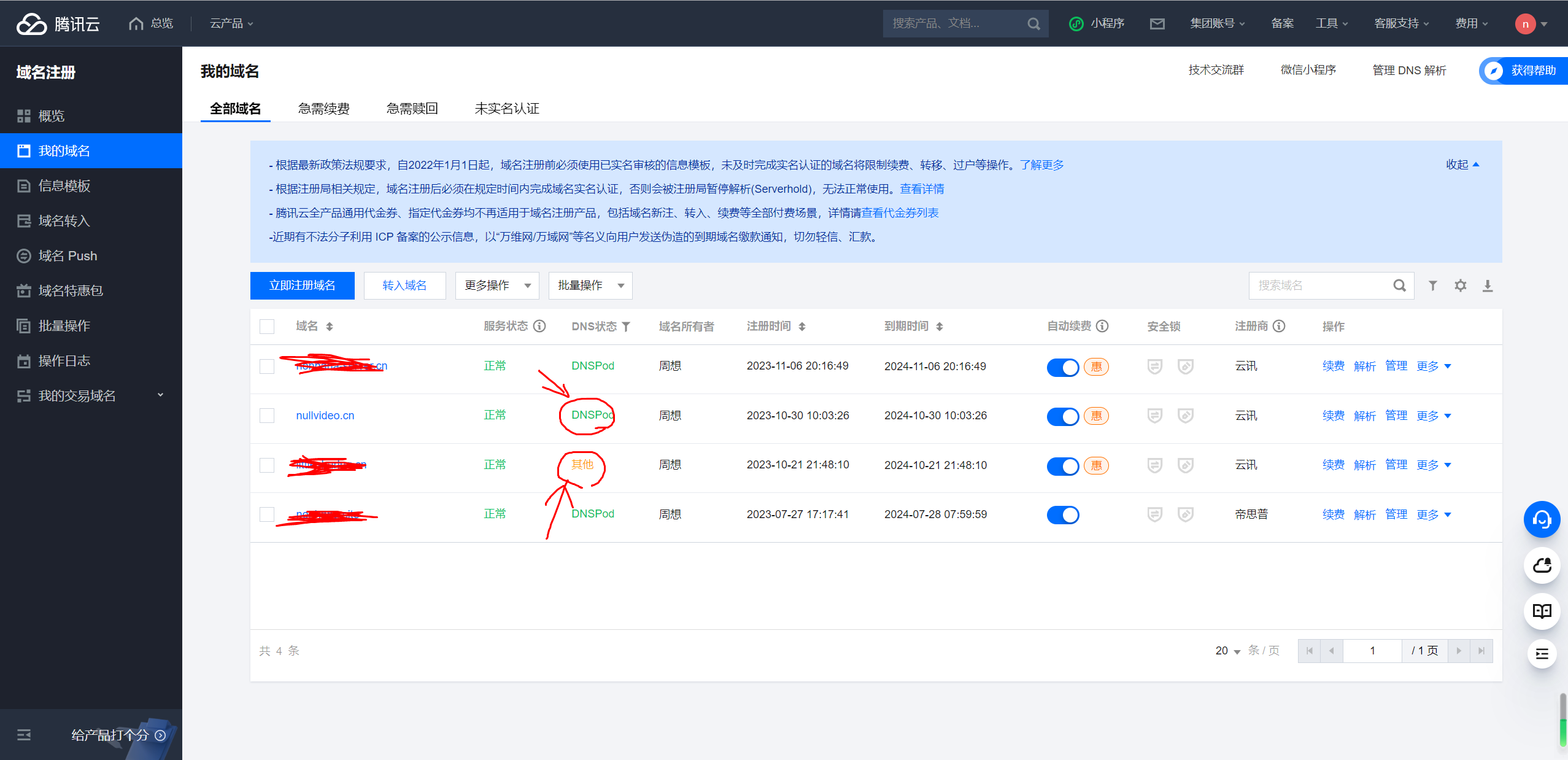
    接下来启动腾讯云域名管理后台https://console.cloud.tencent.com/domain。我这边有一个是已经解析到cloudflare所以DNS状态变成了其他,我现在要改的这个nullvideo.cn待会儿也会变成其他。

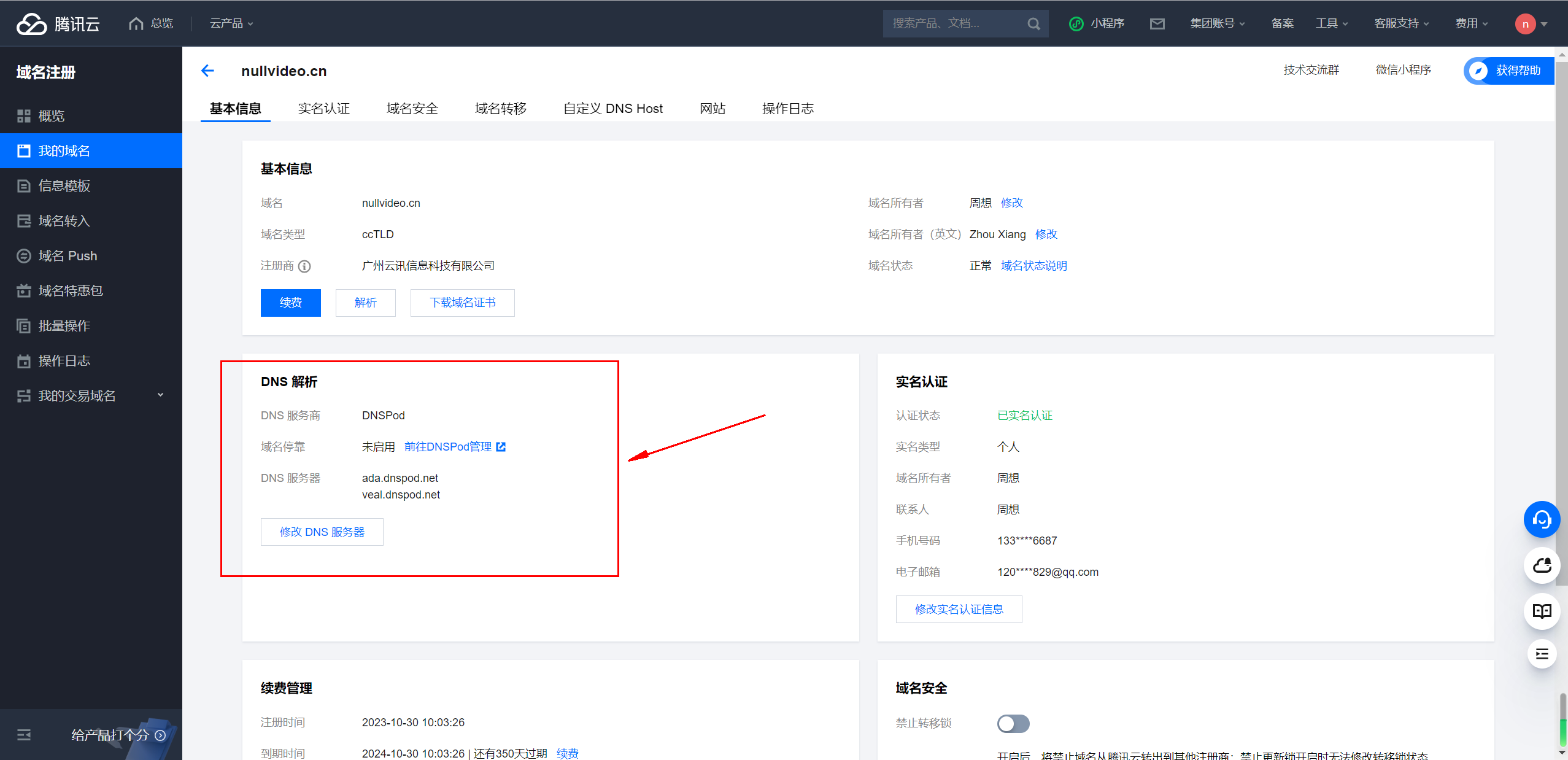
    点击“解析”按钮右边的“管理”按钮,进入域名管理页,找到DNS解析部分:

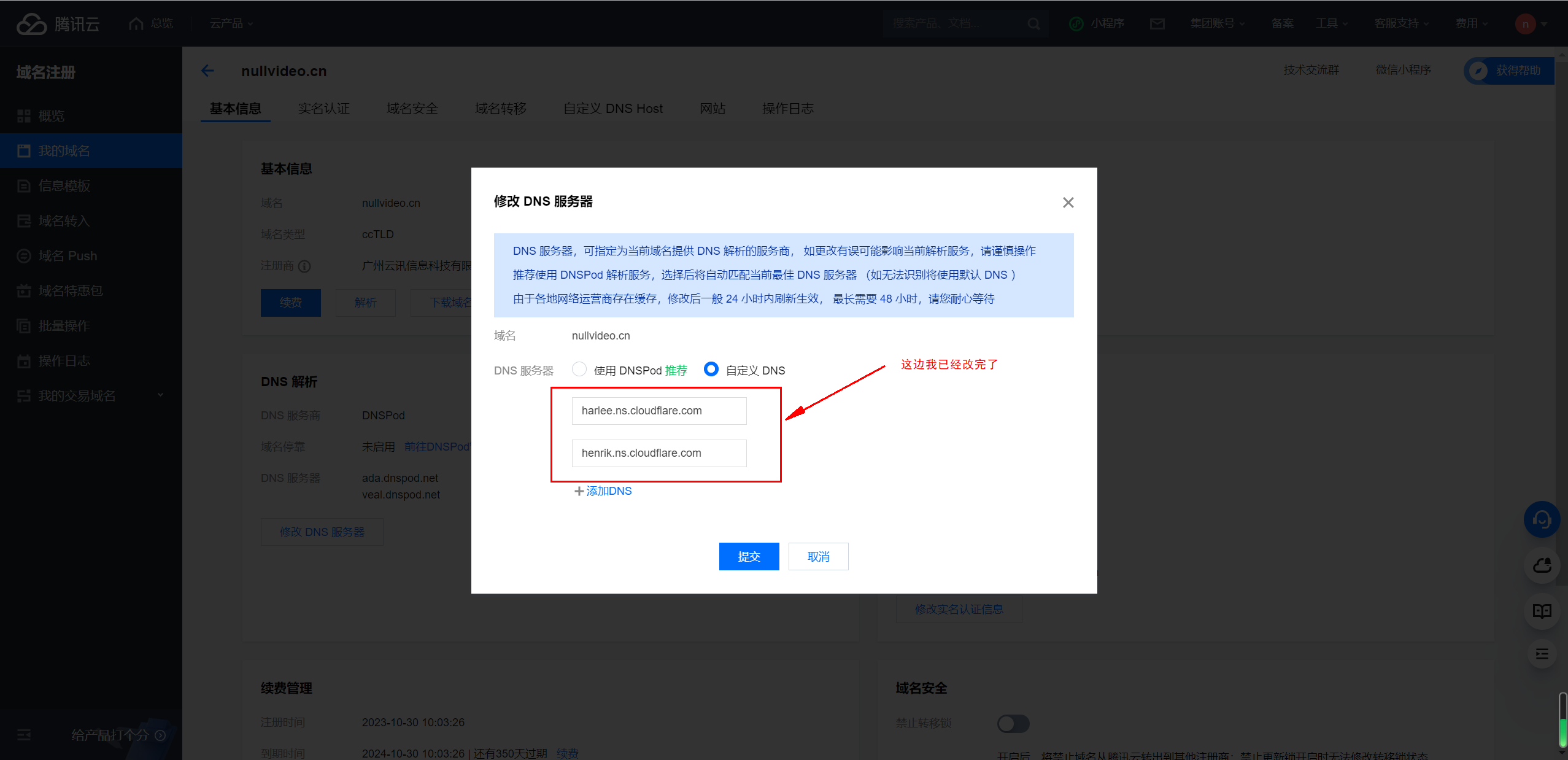
    然后点击“修改DNS服务器”,把刚刚Cloudflare给我们的两个DNS地址黏贴到原本的DNS地址处:

    保存然后等待dns缓存刷新即可,这可能需要1-24小时因为每个域名体质不一样。

    然后回到 Cloudflare 控制台就好了。至此,更换完成了。

    2. 在Vercel上为自己部署好的前端应用添加新的域名解析

    2.1 将自己的应用通过vercel进行部署

    这个就不在这里展开说了,你只要登录vercel的官网https://vercel.com注册或者登录账号,然后自己跟着它的指示一步步来,最不济可以去查一查资料。。。反正这里不展开说了,默认大家都已经有一个部署好了的vercel应用了。

    2.2 去Cloudflare添加域名解析记录

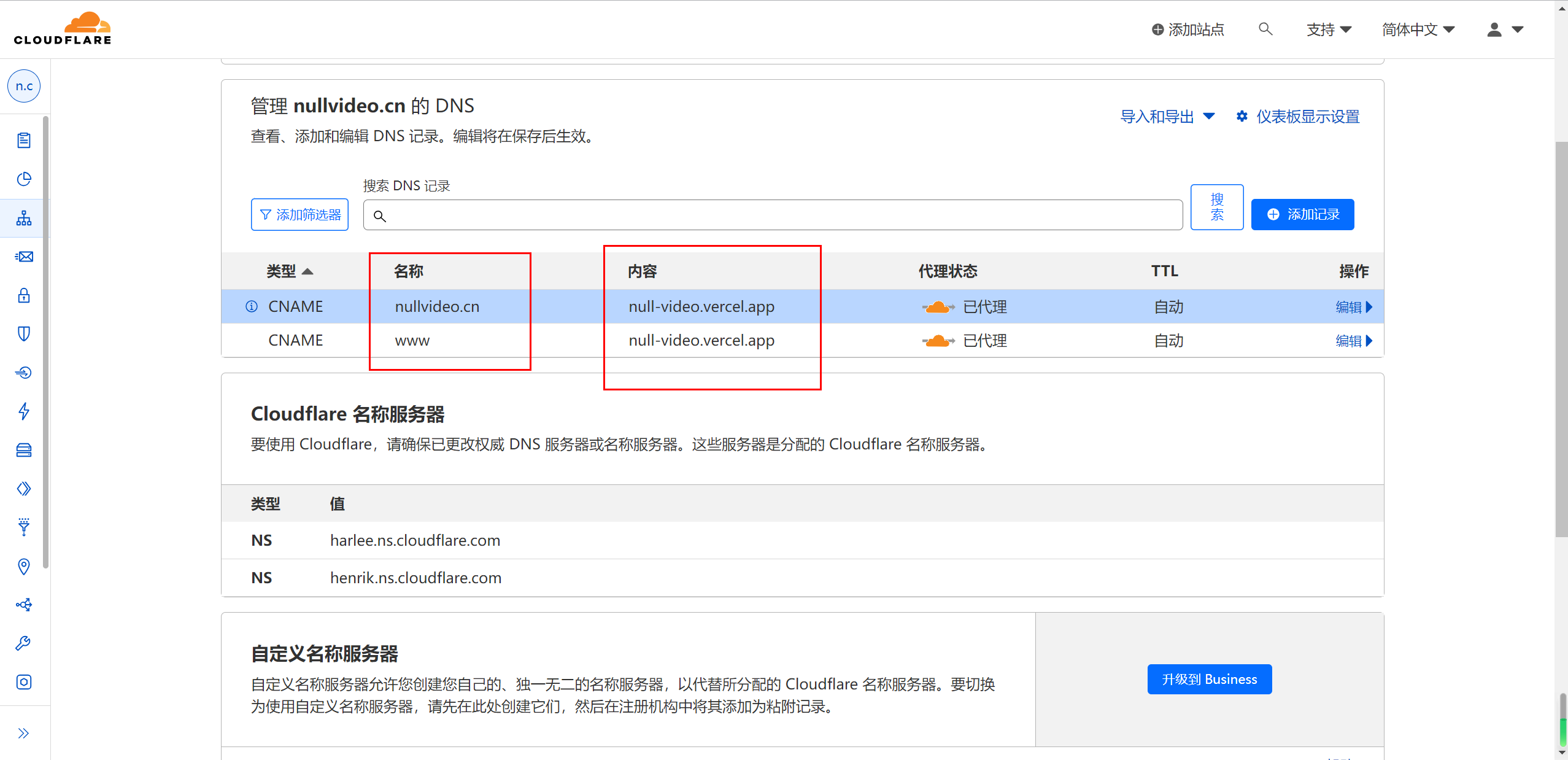
    在 Cloudflare 添加CNAME类型的解析,比如这个项目就是把nullvideo.cn重定向到null-video.vercel.app,并打开 proxy 服务。我在这边为了对应根路径访问和www访问,两个都加上了。

    2.3 对部署好的vercel应用添加除了自带域名的新域名解析

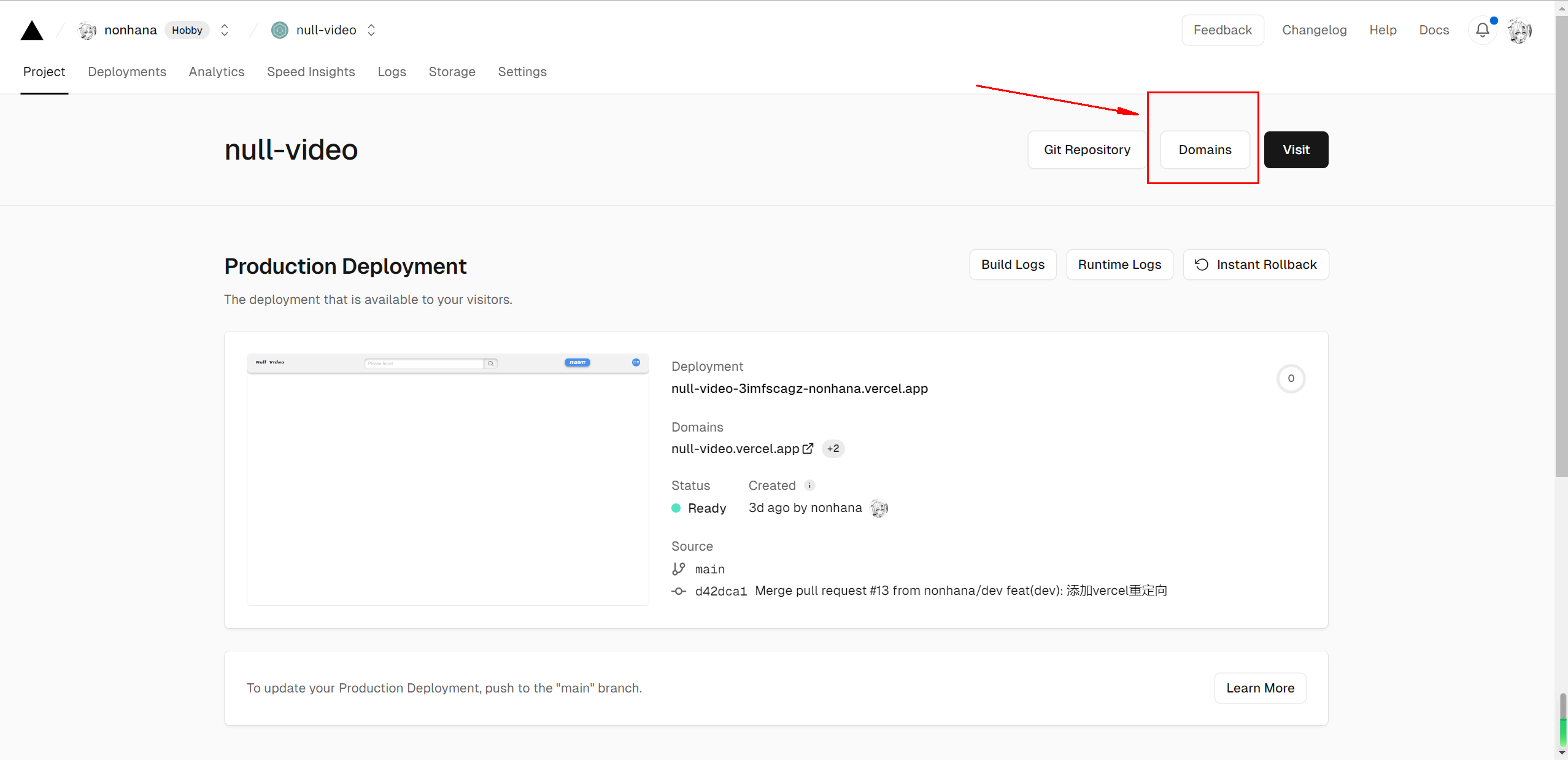
    进入到部署好了的项目的主页,可以看到一个“Domain”的按钮,点击进入:

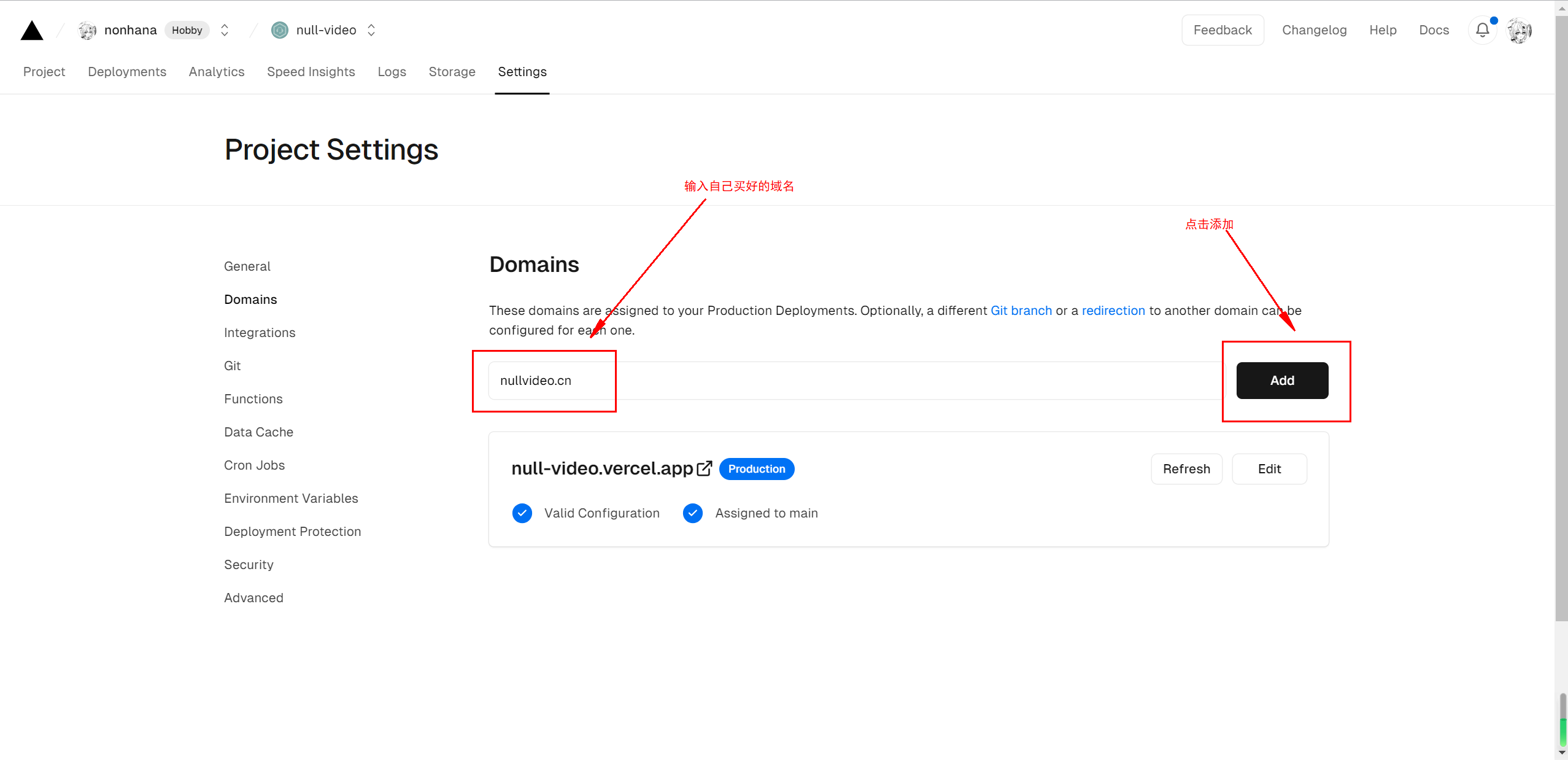
    然后进入之后,输入你买好的域名然后点击Add:

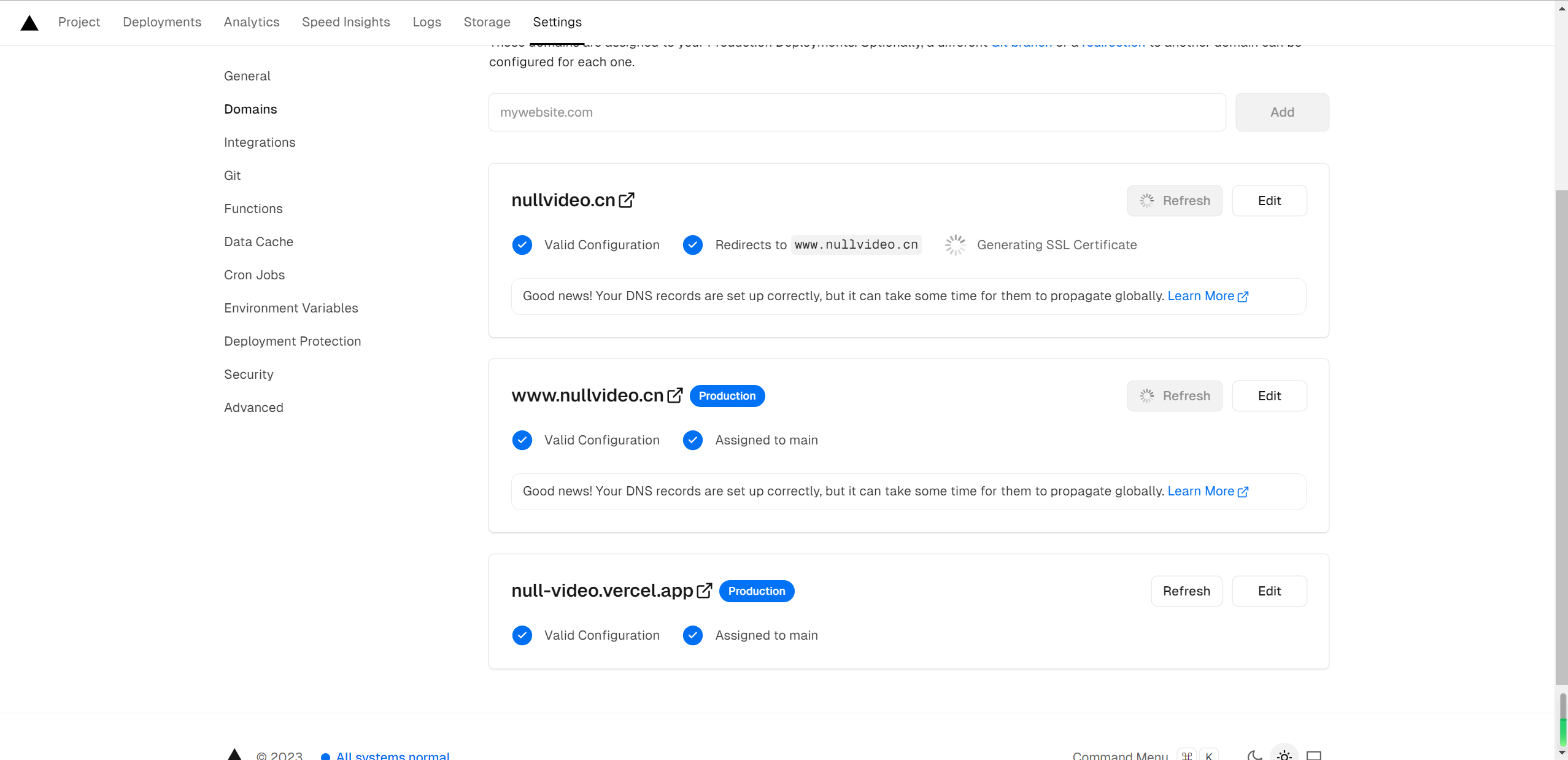
    选择默认的方案,也就是把根域名和www解析一起加上。

    添加之后会进行校验,校验完成了之后就可以进行访问了。。。看起来是这样,实际上还是有问题的!!!

    2.4 Vercel + Cloudflare = 重定向次数过多解决方案

    你把域名解析添加好了,校验也通过了,然后你会直接点击访问:

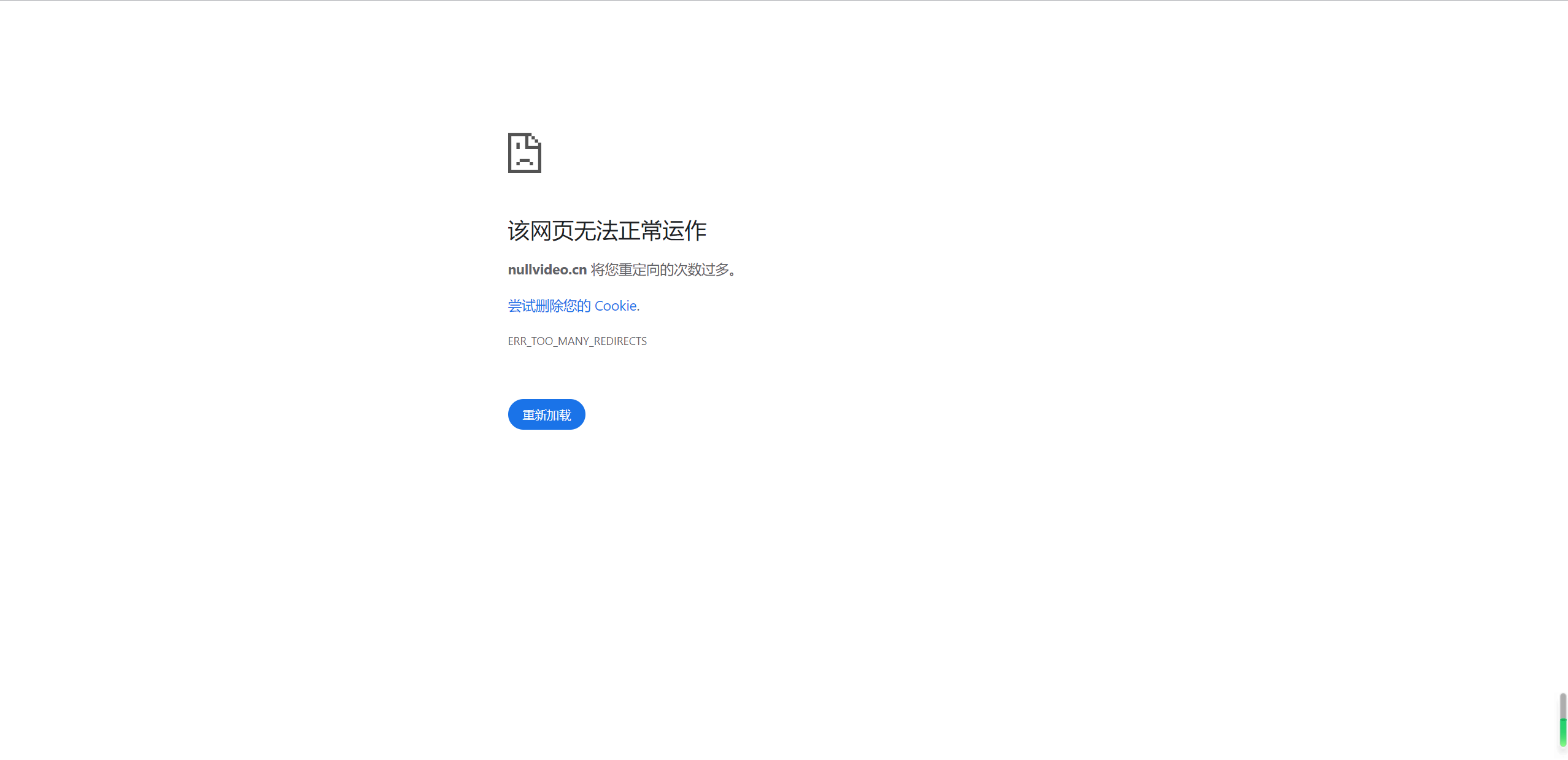
    没错,你会遇到重定向次数过多的问题。

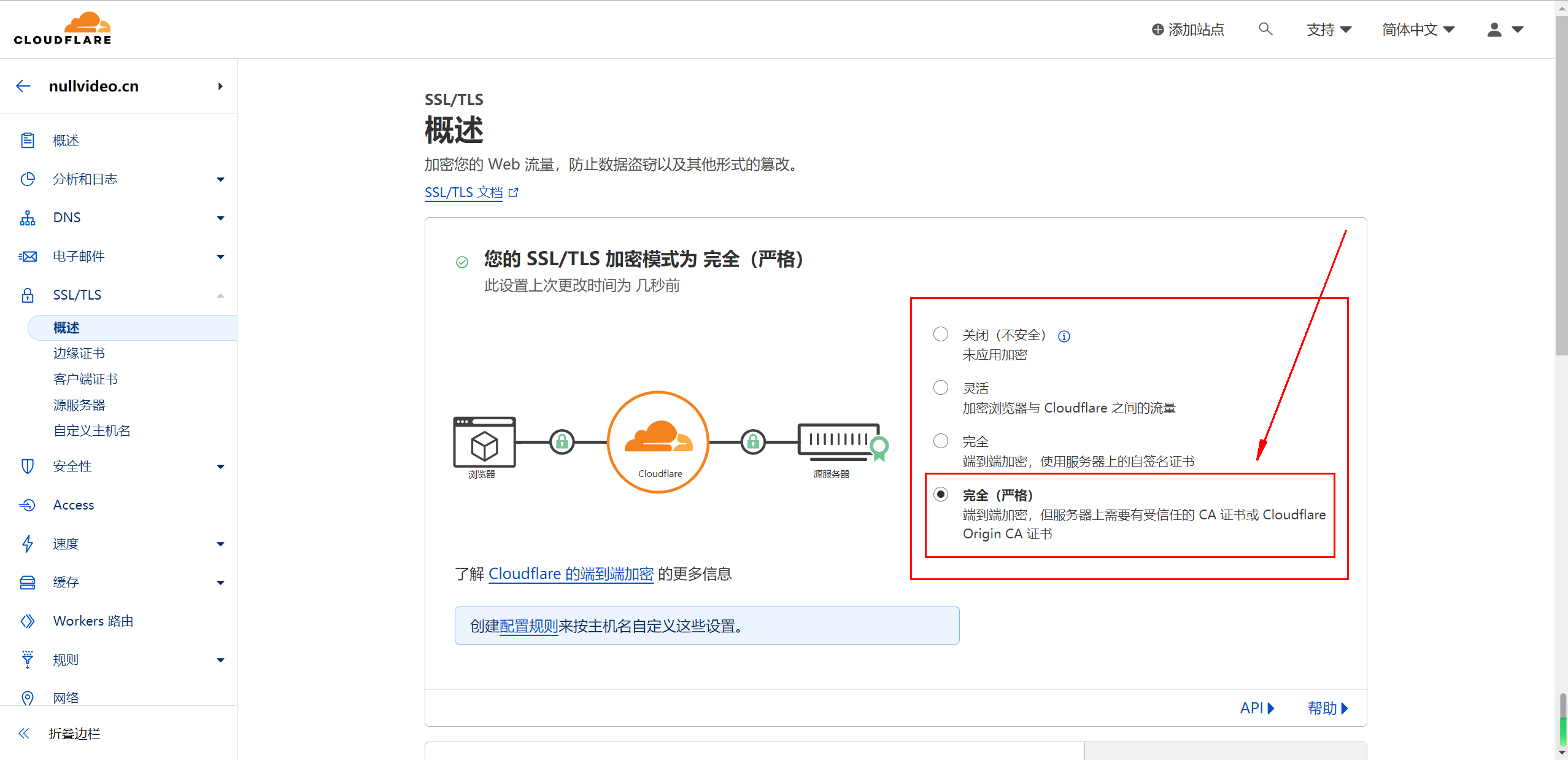
    这其实是Cloudflare为添加的站点加密模式设置错误导致的。

    进入 Cloudflare Dashboard,点击有问题的域名,打开左侧的 SSL/TLS 设置,在 Overview 中设置加密模式为完全或完全(严格)即可。

    这样子之后你的vercel应用应该是可以正常的在国内进行访问了。

  • vue-i18n实际用法

    1. 安装: pnpm add vue-i18n@next

    2. 创建language文件夹

    3. 在language下创建index.ts

    1
    2
    3
    4
    5
    6
    7
    8
    9
    10
    11
    12
    13
    14
    15
    16
    17
    18
    19
    20
    import { createI18n } from 'vue-i18n'

    const modules: any = import.meta.glob('./modules/*.ts', { eager: true })

    const messages: any = {}

    Object.keys(modules).forEach((lang: any) => {
    const name = lang.split('/').pop().split('.')[0]
    messages[name] = modules[lang].default
    })

    const i18n = createI18n({
    locale: localStorage.getItem('guide-language') || 'cn',
    fallbackLocale: 'cn',
    messages,
    legacy: false,
    globalInjection: true,
    })

    export default i18n
    1. 在language文件夹下创建modules,并放入对应的语言ts文件,如
    1
    2
    3
    export default {
    test: '测试',
    }
    1. 使用
    1
    2
    3
    import i18n from '@/language/index.ts'

    app.use(i18n)
    1. 创建store文件,language.ts
    1
    2
    3
    4
    5
    6
    7
    8
    9
    10
    11
    12
    13
    14
    15
    export const useLanguageStore = defineStore('language', () => {
    const { locale } = useI18n()

    const language = useLocalStorage('guide-language', 'cn')

    const changeLanguage = (lang: string) => {
    language.value = lang
    locale.value = lang
    }

    return {
    language,
    changeLanguage,
    }
    })
  • vue3.0中使用i18n插件来实现国际化以及切换语言

    1. 下载il8n插件,目前通过npm install vue-il8n下载的il8n版本是无法支持vue3.0,因此要使用npm install vue-i18n@next来获取最新的版本,我这边是的版本是^9.0.0-beta.17

      1
      2
      3
      npm install vue-i18n@next
      yarn add vue-i18n@next
      pnpm add vue-i18n@next(个人推荐)
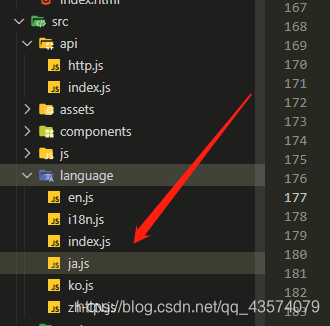
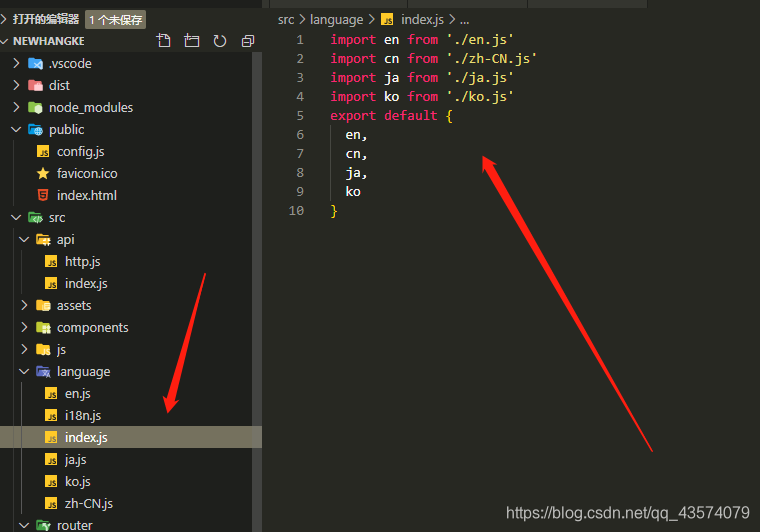
    2. 在src下面创建一个名为language的文件名,并在文件下面创建zh-CN、en、ja、ko四个js文件(中文、英文、日文、韩文)

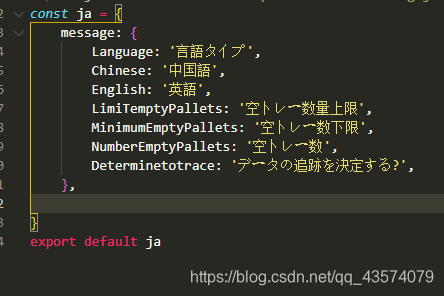
    3. 然后在四个js文件中写入对应的方法,这里面存放的是我们要进行切换的语言,以下是我在名为ja.js文件写的日文语言,同样的方法在其他三个文件中依次写入

    4. 在language文件下面在创建一个index.js文件

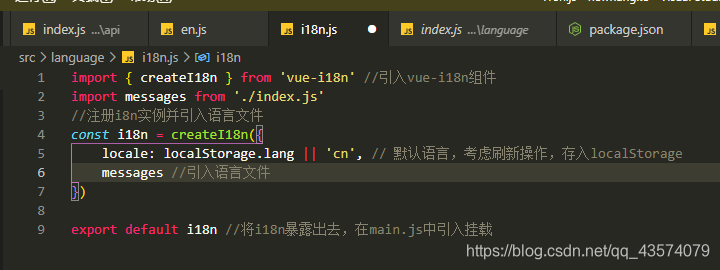
    5. 在language文件下面在创建一个il8n的文件文件

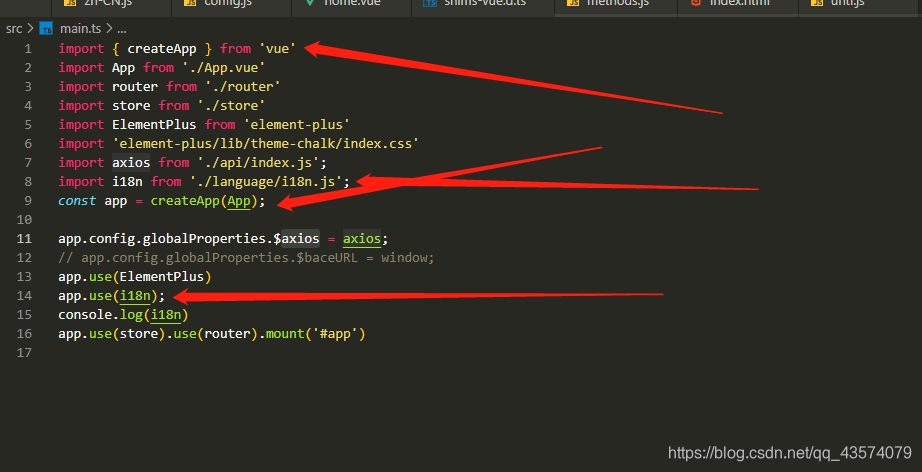
    6. 在main.js中引入

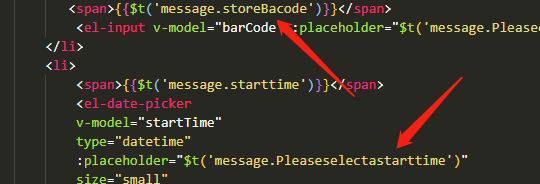
    7. 在组件中使用{{$t('message.storeBacode')}}来显示在页面上

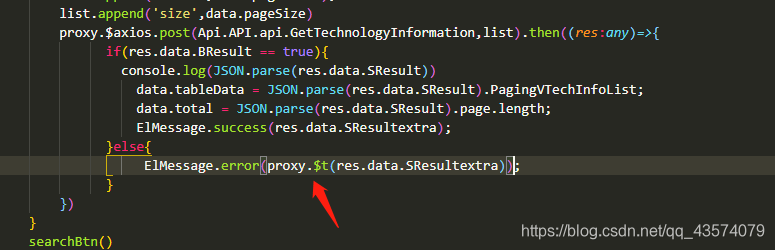
    8. 在js中使用,vue2.0中是this.$t('message.storeBacode'),但是在vue3.0中已经取消掉了this,因此为proxy.$t('message.storeBacode')

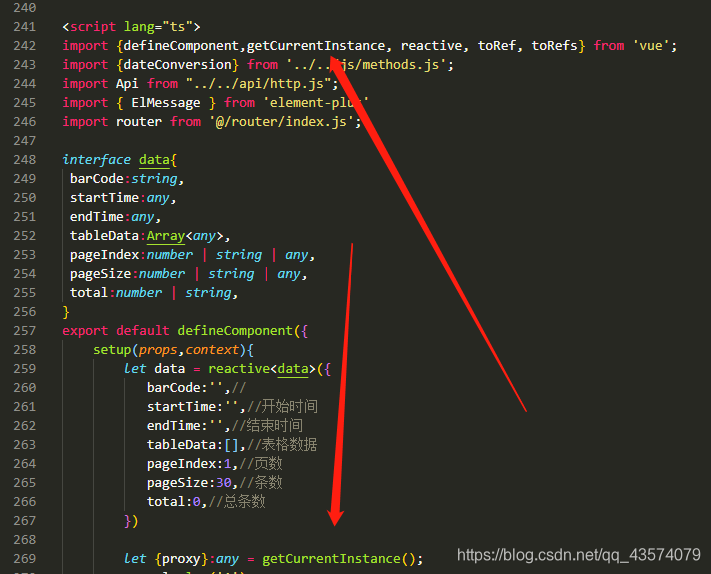
      1. 在vue中引入getCurrentInstance,在对getCurrentInstance进行挂载

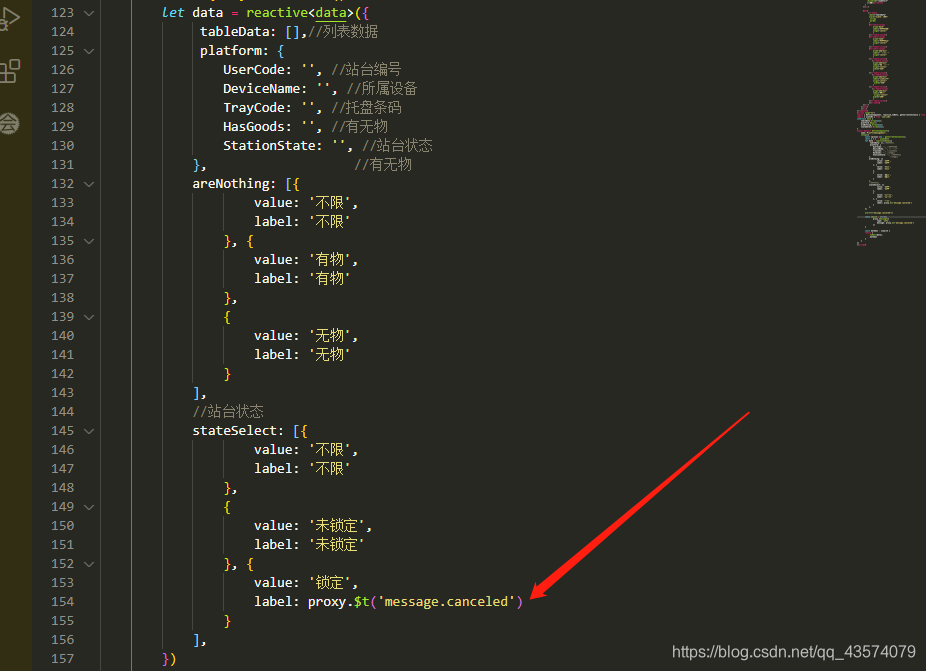
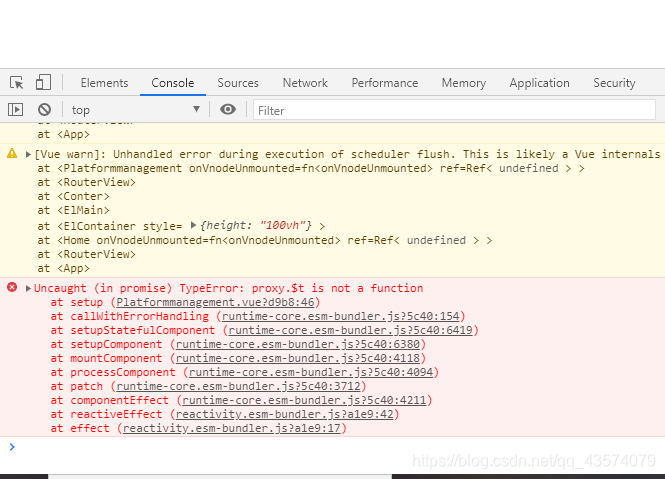
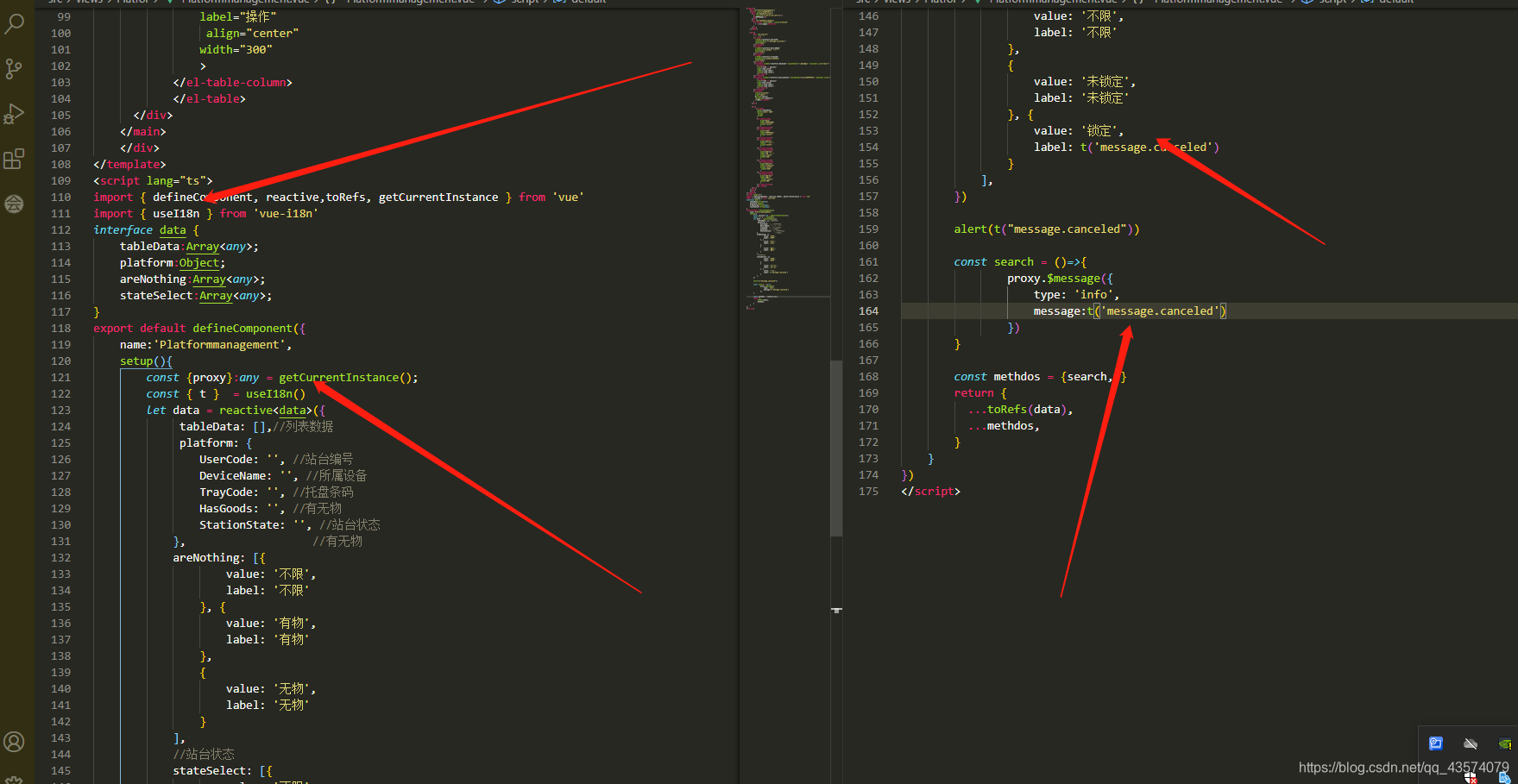
      2. 在reactive中使用 proxy.$t(‘message.unlimited’) 会报错

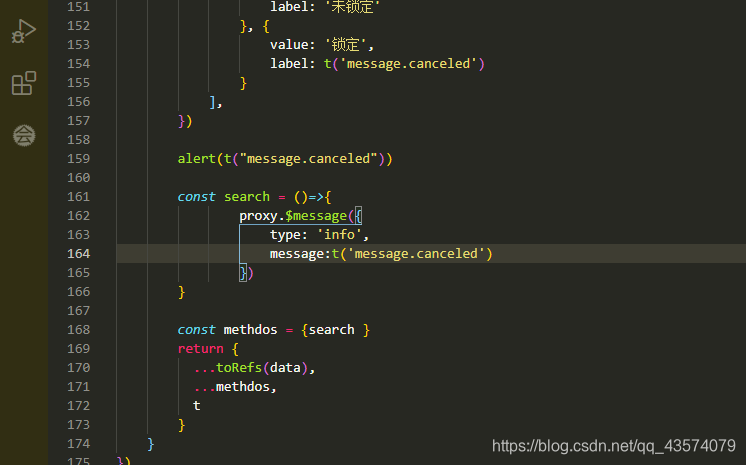
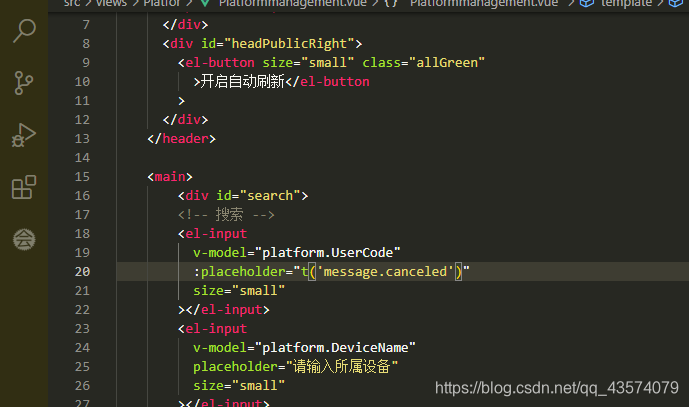
      解决方法:引入 useI18n() ,并使用格式 t('message.canceled') 来进行页面渲染,同理在js中也可以这样使用,不需要proxy来操作,但是引入的时候,const {t} = useIl8n()要写在reactive前面

      不需要proxy操作方法的编写

      为什么用t来代替$t(下面的方法和$t并不冲突,之所以用t是为了解决在reactive中报错的问题)

      $t是Vue18n实例的功能。它具有以下优点和缺点:可以在模板中灵活使用胡子语法{},还可以在Vue组件实例中使用计算的道具和方法,但是缺点也很明显,每次发生重新渲染时都会执行,因此确实有翻译成本。

      v-t(t)具有更好的性能比$t功能,由于其前期的翻译是可能的这是由提供的Vue的编译器模块VUE,国际扩展性,可以进行更多性能优化。但是缺点同样也很明显:能像$t它那样灵活地使用,它相当复杂。与一起翻译的内容v-t会插入textContent元素的中。此外,当您使用服务器端渲染,您需要设置自定义转换到directiveTransforms了的选项compile功能@vue/compiler-ssr。

    9. 组件内切换语言(重点)

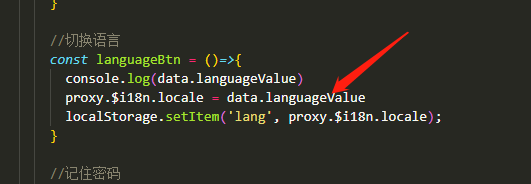
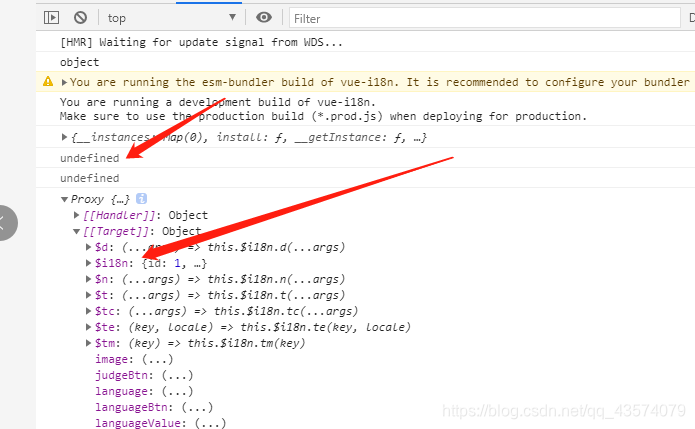
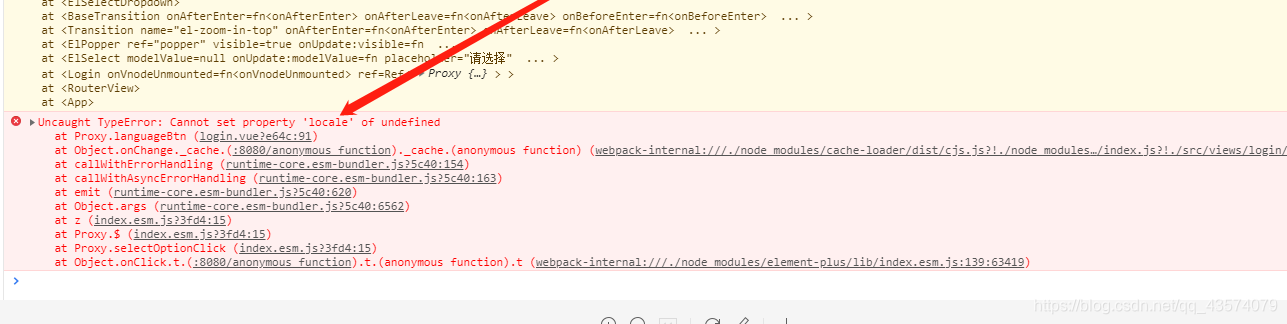
      1. 误区(在vue2.0中是用this.$il8n.locale = ‘cn’ 这种方法来实现语言切换是正确,但是在vue3.0中虽然proxy相当于vue2.0中的this,但是这样切换语言是错误,后台会提示undefined,虽然此时的il8n确实挂载上去了,且locale也会报错,这个问题我也不知道是什么情况,改怎么去解决呢)

      2. 解决方法(虽然不知道 是什么情况,但是最后问题还是解决了,我们来看解决思路)

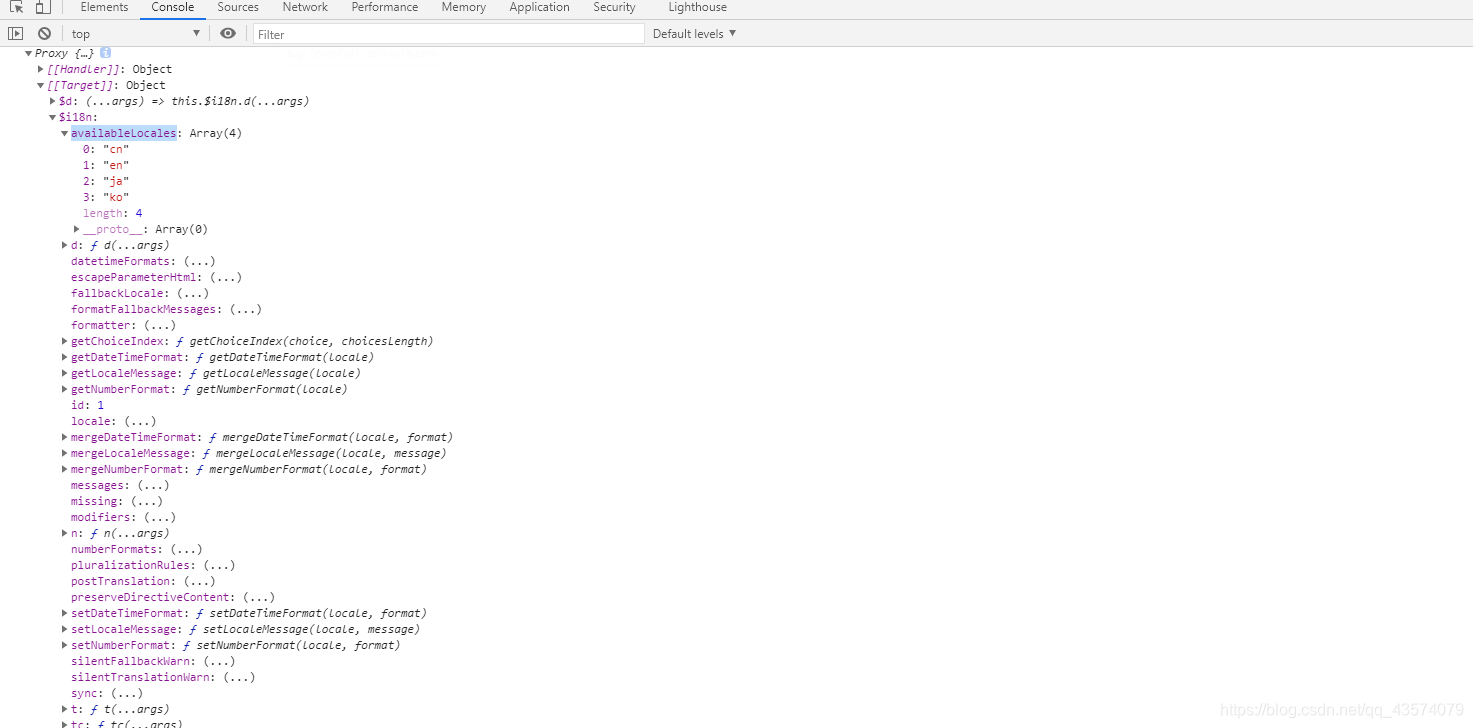
        1. 打印proxy,然后找到il8n里面的availableLocales这个数组,看到我们前面要设置的几种语言,然后我们把它取出来

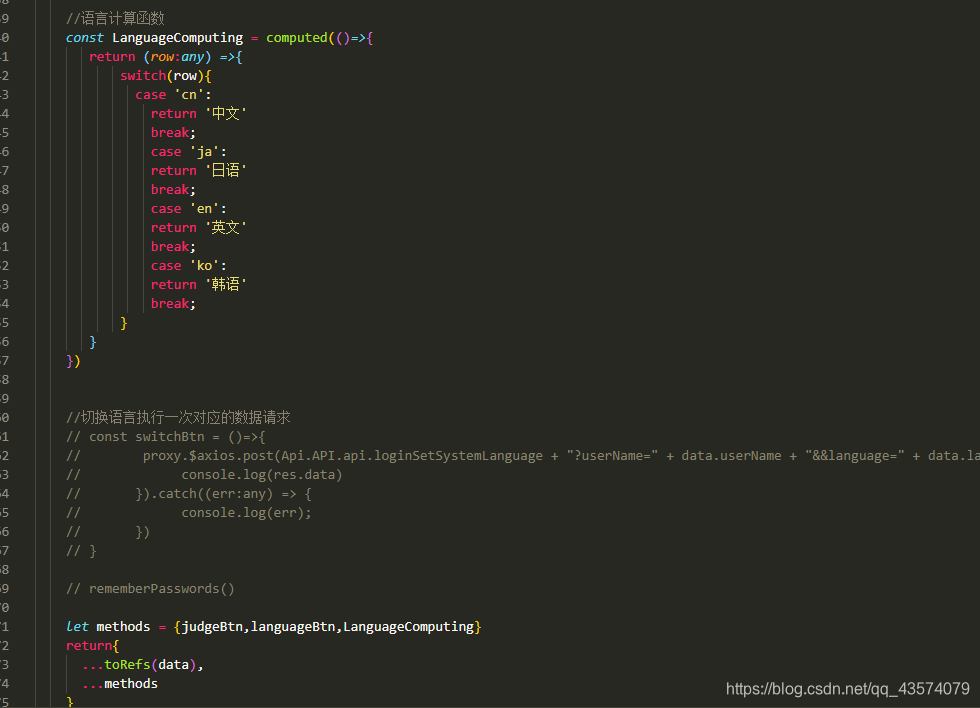
        2. 取出il8n里面的availableLocales并把它渲染到select里面,当然在这之前要先做一下计算,不然打印出来的就是cn、en、ja、ka,作为开发者这个我们自己是能看懂得,但是对于用户用于,它是看不懂得

          计算并转换(写了方法得小伙伴记得return出去,不然找不到方法会报错得哦)

  • 6个实用的Vue自定义指令推荐

    在 Vue2.0,除了核心功能默认内置的指令 ( v-model 和 v-show ),Vue 也允许注册自定义指令。在 Vue2.0 中,代码复用和抽象的主要形式是组件。然而,有的情况下,你仍然需要对普通 DOM 元素进行底层操作,这时候就会用到自定义指令。

    Vue 自定义指令有全局注册和局部注册两种方式。全局注册指令的方式,通过 Vue.directive( id, [definition] ) 方式注册全局指令。如果想注册局部指令,组件中也接受一个directives的选项。

    1
    2
    3
    4
    5
    6
    7
    8
    9
    10
    11
    12
    13
    14
    15
    16
    17
    18
    // 注册一个全局自定义指令 `v-focus`
    Vue.directive('focus', {
    // 当被绑定的元素插入到 DOM 中时……
    inserted: function (el) {
    // 聚焦元素
    el.focus()
    }
    })

    // 注册一个局部自定义指令 `v-focus`
    directives: {
    focus: {
    // 指令的定义
    inserted: function (el) {
    el.focus()
    }
    }
    }

    然后我们可以在模板中任何元素上使用心得v-focus property,如下:

    1
    <input v-focus>

    当我们需要批量注册自定义指令时,写很多个``Vue.directive( id, [definition] ) 会导致代码冗余,所以我们可以利用Vue.use()` 的特性,完成批量注册。

    批量注册指令,新建 directives/directive.js 文件

    1
    2
    3
    4
    5
    6
    7
    8
    9
    10
    11
    12
    13
    14
    15
    16
    // 导入指令定义文件
    import debounce from './debounce'
    import throttle from './throttle'
    // 集成一起
    const directives = {
    debounce,
    throttle,
    }
    //批量注册
    export default {
    install(Vue) {
    Object.keys(directives).forEach((key) => {
    Vue.directive(key, directives[key])
    })
    },
    }

    main.js 引入,并Vue.use() 调用完成批量注册。

    1
    2
    3
    import Vue from 'vue'
    import Directives from './directives/directive.js'
    Vue.use(Directives)

    一个指令定义对象可以提供如下几个钩子函数 (均为可选):

    • bind: 只调用一次,指令第一次绑定到元素时调用,可以定义一个在绑定时执行一次的初始化动作,此时获取父节点为null。
    • inserted: 被绑定元素插入父节点时调用(仅保证父节点存在,但不一定已被插入文档中),此时可以获取到父节点。
    • update: 所在组件的 VNode 更新时调用,但是可能发生在其子 VNode 更新之前。指令的值可能发生了改变,也可能没有。但是你可以通过比较更新前后的值来忽略不必要的模板更新
    • componentUpdated: 指令所在组件的 VNode 及其子 VNode 全部更新后调用。
    • unbind: 只调用一次, 指令与元素解绑时调用。

    接下来我们来看一下钩子函数的参数 (即 elbindingvnodeoldVnode)。

    指令钩子函数会被传入以下参数:

    • el:指令所绑定的元素,可以用来直接操作 DOM。
    • binding:一个对象,包含以下 property:
      • name:指令名,不包括 v- 前缀。
      • value:指令的绑定值,例如:v-my-directive="1 + 1" 中,绑定值为 2
      • oldValue:指令绑定的前一个值,仅在 updatecomponentUpdated 钩子中可用。无论值是否改变都可用。
      • expression:字符串形式的指令表达式。例如 v-my-directive="1 + 1" 中,表达式为 "1 + 1"
      • arg:传给指令的参数,可选。例如 v-my-directive:foo 中,参数为 "foo"
      • modifiers:一个包含修饰符的对象。例如:v-my-directive.foo.bar 中,修饰符对象为 { foo: true, bar: true }
    • vnode:Vue 编译生成的虚拟节点。移步 VNode API 来了解更多详情。
    • oldVnode:上一个虚拟节点,仅在 updatecomponentUpdated 钩子中可用。

    注意:除了 el 之外,其它参数都应该是只读的,切勿进行修改。如果需要在钩子之间共享数据,建议通过元素的 dataset 来进行。

    下面分享几个实用的 Vue 自定义指令

    • 长按指令 v-longpress
    • 函数防抖指令 v-debounce
    • 函数节流指令 v-throttle
    • 点击元素外部指令 v-click-out
    • 弹窗限制外部滚动指令 v-scroll-pop
    • 神策埋点指令v-sensor

    1. v-longpress

    需求:当用户按下鼠标左键或移动端单指触碰,并按住按钮几秒钟时,视为一次长按,触发对应的函数。

    思路:

    1. 定义一个计时器, n 秒后执行函数,n作为参数。
    2. 当用户按下按钮时触发 mousedowntouchstart 事件,启动计时器。
    3. 如果 clickmouseuptouchendtouchcancel 事件在 n 秒内被触发,则清除计时器,视为普通点击事件。
    4. 如果计时器没有在 n秒内清除,则视为一次长按,触发对应的函数。
    1
    2
    3
    4
    5
    6
    7
    8
    9
    10
    11
    12
    13
    14
    15
    16
    17
    18
    19
    20
    21
    22
    23
    24
    25
    26
    27
    28
    29
    30
    31
    32
    33
    34
    35
    36
    37
    38
    39
    40
    41
    42
    43
    44
    45
    46
    47
    48
    49
    50
    51
    52
    53
    54
    55
    const longpress = {
    bind: function (el, {value:{fn,time}}) {
    //没绑定函数直接返回
    if (typeof fn !== 'function') return
    // 定义定时器变量
    el._timer = null
    // 创建计时器( n秒后执行函数 )
    el._start = (e) => {
    //e.type表示触发的事件类型如mousedown,touchstart等
    //pc端: e.button表示是哪个键按下0为鼠标左键,1为中键,2为右键
    //移动端: e.touches表示同时按下的键为个数
    if ( (e.type === 'mousedown' && e.button && e.button !== 0) ||
    (e.type === 'touchstart' && e.touches && e.touches.length > 1)
    ) return;
    //定时长按n秒后执行事件
    if (el._timer === null) {
    el._timer = setTimeout(() => {
    fn()
    }, time)
    //取消浏览器默认事件,如右键弹窗
    el.addEventListener('contextmenu', function(e) {
    e.preventDefault();
    })
    }
    }
    // 如果两秒内松手,则取消计时器
    el._cancel = (e) => {
    if (el._timer !== null) {
    clearTimeout(el._timer)
    el._timer = null
    }
    }
    // 添加计时监听
    el.addEventListener('mousedown', el._start)
    el.addEventListener('touchstart', el._start)
    // 添加取消监听
    el.addEventListener('click', el._cancel)
    el.addEventListener('mouseout', el._cancel)
    el.addEventListener('touchend', el._cancel)
    el.addEventListener('touchcancel', el._cancel)
    },
    // 指令与元素解绑时,移除事件绑定
    unbind(el) {
    // 移除计时监听
    el.removeEventListener('mousedown', el._start)
    el.removeEventListener('touchstart', el._start)
    // 移除取消监听
    el.removeEventListener('click', el._cancel)
    el.removeEventListener('mouseout', el._cancel)
    el.removeEventListener('touchend', el._cancel)
    el.removeEventListener('touchcancel', el._cancel)
    },
    }

    export default longpress

    使用:给 Dom 加上 v-longpress 及参数即可

    1
    2
    3
    4
    5
    6
    7
    8
    9
    10
    11
    12
    13
    <template>
    <button v-longpress="{fn: longpress,time:2000}">长按</button>
    </template>

    <script>
    export default {
    methods: {
    longpress () {
    console.log('长按指令生效')
    }
    }
    }
    </script>

    2. v-debounce

    背景:在开发中,有时遇到要给input或者滚动条添加监听事件,需要做防抖处理。

    需求:防止input或scroll事件在短时间内被多次触发,使用防抖函数限制一定时间后触发。

    思路:

    1. 定义一个延迟执行的方法,如果在延迟时间内再调用该方法,则重新计算执行时间。
    2. 将事件绑定在传入的方法上。
    1
    2
    3
    4
    5
    6
    7
    8
    9
    10
    11
    12
    13
    14
    15
    16
    17
    18
    19
    const debounce = {
    inserted: function (el, {value:{fn, event, time}}) {
    //没绑定函数直接返回
    if (typeof fn !== 'function') return
    el._timer = null
    //监听点击事件,限定事件内如果再次点击则清空定时器并重新定时
    el.addEventListener(event, () => {
    if (el._timer !== null) {
    clearTimeout(el._timer)
    el._timer = null
    }
    el._timer = setTimeout(() => {
    fn()
    }, time)
    })
    },
    }

    export default debounce

    使用:给 Dom 加上 v-debounce 及回调函数即可

    1
    2
    3
    4
    5
    6
    7
    8
    9
    10
    11
    12
    13
    14
    15
    16
    <template>
    <input v-debounce="{fn: debounce, event: 'input', time: 5000}" />
    <div v-debounce="{fn: debounce, event: 'scroll', time: 5000}">
    <p>文字文字文字文字...</p>
    </div>
    </template>

    <script>
    export default {
    methods: {
    debounce(){
    console.log('debounce 防抖')
    },
    }
    }
    </script>

    3. v-throttle

    背景:在开发中,有些提交保存按钮有时候会在短时间内被点击多次,这样就会多次重复请求后端接口,造成数据的混乱,比如立即购买按钮,多次点击就会多次调用创建订单接口。

    需求:防止按钮在短时间内被多次点击,使用节流函数限制规定时间内只能点击一次。

    思路:

    1. 定义一个由开关(默认为开)控制是否执行的方法,第一次执行函数时将开关关闭,在规定时间内再调用该方法,则不会再次执行,直至规定时间过后开关打开。
    2. 将事件绑定在 click 方法上。
    1
    2
    3
    4
    5
    6
    7
    8
    9
    10
    11
    12
    13
    14
    15
    16
    17
    18
    19
    20
    21
    22
    23
    24
    25
    26
    const throttle = {
    bind:function (el,{value:{fn,time}}) {
    if (typeof fn !== 'function') return
    el._flag = true;//开关默认为开
    el._timer = null
    el.handler = function () {
    if (!el._flag) return;
    //执行之后开关关闭
    el._flag && fn()
    el._flag = false
    if (el._timer !== null) {
    clearTimeout(el._timer)
    el._timer = null
    }
    el._timer = setTimeout(() => {
    el._flag = true;//三秒后开关开启
    }, time);
    }
    el.addEventListener('click',el.handler)
    },
    unbind:function (el,binding) {
    el.removeEventListener('click',el.handler)
    }
    }

    export default throttle

    使用:给Dom加上v-throttle 及回调函数即可。

    1
    2
    3
    4
    5
    6
    7
    8
    9
    10
    11
    12
    13
    <template>
    <button v-throttle="{fn: throttle,time:3000}">throttle节流</button>
    </template>

    <script>
    export default {
    methods: {
    throttle () {
    console.log('throttle 节流 只触发一次')
    }
    }
    }
    </script>

    4. v-clickOut

    背景:在我们的项目里,经常会出现一个弹窗,需要点击弹窗外部关闭该弹窗。

    需求:实现一个指令,点击目标区域外部,触发指定函数。

    思路:

    1. 判断点击的元素是否为目标元素,是则不作为,否则触发指定函数。
    1
    2
    3
    4
    5
    6
    7
    8
    9
    10
    11
    12
    13
    14
    15
    16
    17
    18
    19
    20
    21
    22
    23
    24
    25
    const clickOut = {
    bind(el,{value}){
    function clickHandler(e) {
    //先判断点击的元素是否是本身,如果是本身,则返回
    if (el.contains(e.target)) return;
    //判断指令中是否绑定了函数
    if (typeof value === 'function') {
    //如果绑定了函数,则调用函数,此处value就是clickImgOut方法
    value()
    }
    }
    // 给当前元素绑定个私有变量,方便在unbind中可以解除事件监听
    el.handler = clickHandler;
    //添加事件监听
    setTimeout(() => {
    document.addEventListener('click',el.handler);
    }, 0);
    },
    unbind(el){
    //解除事件监听
    document.removeEventListener('click',el.handler);
    }
    }

    export default clickOut

    使用,将需要用到该指令的元素添加 v-click-out

    1
    2
    3
    4
    5
    6
    7
    8
    9
    10
    11
    12
    13
    14
    15
    16
    17
    18
    19
    20
    21
    22
    23
    24
    25
    <template>
    <div>
    <button @click="isImgShow = true">展示弹窗</button>
    <div v-click-out="clickImgOut" v-if="isImgShow" class="pop">
    <img src="https://xxx.jpg" alt="">
    <p>文字文字文字文字文字文字文字文字文字文字文字文字文字文字文字文字</p>
    </div>
    </div>
    </template>

    <script>
    export default {
    data(){
    return {
    isImgShow : false
    }
    },
    methods:{
    clickImgOut(){
    this.isImgShow = false;
    console.log('点击弹窗外部')
    }
    }
    }
    </script>

    5. v-scrollPop

    背景:在我们的项目中,经常使用弹窗展示活动规则,活动规则过长需要滚动时,时长会导致外部滚动。这时针对这种情况,我们可以通过全局自定义指令来处理。

    需求:自定义一个指令,使得弹窗内部内容可以滚动,外部无法滚动。

    思路:

    1. 当弹窗展示时,记录滚动条滚动距离,然后给body和html设置固定定位,高度100%,top值为滚动距离。
    2. 当弹窗解除时,恢复原先样式,并把滚动距离设置成原来的值。
    1
    2
    3
    4
    5
    6
    7
    8
    9
    10
    11
    12
    13
    14
    15
    16
    17
    18
    19
    20
    21
    22
    23
    24
    25
    26
    27
    28
    const scrollPop = {
    bind(el) {
    //定义此时到元素的内容垂直滚动的距离
    el.st = window.pageYOffset || document.documentElement.scrollTop || document.body.scrollTop
    let cssStr = `overflow: hidden;width: 100%; height: 100%; position: fixed; top: ${- el.st}px;`
    document.querySelector('html').cssText = cssStr
    document.body.style.cssText = cssStr
    },
    unbind(el,{value}) {
    let cssStr = 'overflow: auto; height: 100%; position: relative; top: 0px;scroll-behavior: auto'
    document.querySelector('html').cssText = cssStr
    document.body.style.cssText = cssStr
    document.querySelector('html').style.scrollBehavior = 'auto'
    //手动设置滚动距离
    document.documentElement.scrollTop = el.st
    document.body.scrollTop = el.st
    if (value !== 'smooth')return;
    //如果传了滚动方式为smooth平稳滚动即有感滚动,当滚动完毕后,把auto改回smooth
    let timer = setTimeout(() => {
    cssStr = `overflow: auto; height: 100%; position: relative; top: 0px; scroll-behavior: ${value||'smooth'}`
    document.querySelector('html').cssText = cssStr
    document.querySelector('html').style.scrollBehavior = value || 'smooth'
    document.body.style.cssText = cssStr
    }, 1);
    }
    }

    export default scrollPop

    使用:给需要限制的弹窗绑定v-scroll-pop属性,并设置scroll-behavior 值即可。

    1
    2
    3
    4
    5
    6
    <div class="scroll-pop" v-if="isScrollPopShow" v-scroll-pop="'smooth'">
    <div class="content">
    <p>这是很长一段文字,请耐心读完,然后你会发现这段文字并没有什么意义。</p>
    ...
    </div>
    </div>

    6. v-sensor

    背景:目前前端埋点代码大量入侵业务,埋点代码量大且难以区分和维护,现做出优化方案以减少其代码量。

    埋点类型:

    • ElementShow:页面元素显示
    • PopupTrack:弹窗显示
    • $WebClick:点击页面按钮
    • PopupBtnClick:点击弹窗中按钮
    • 自定义事件

    优化方案:

    1.自定义指令 v-sensor=” {el :’Btn_XXX_Tag_Common’,elClick:’Btn_XXX_Tag_Common’} “

    注册封装自定义指令的代码

    1
    2
    3
    4
    5
    6
    7
    8
    9
    10
    11
    12
    13
    14
    15
    16
    17
    18
    19
    20
    21
    22
    23
    24
    25
    26
    27
    28
    29
    30
    31
    32
    33
    34
    35
    36
    37
    38
    39
    40
    41
    42
    43
    44
    45
    46
    47
    48
    49
    50
    51
    52
    53
    54
    55
    56
    57
    58
    59
    60
    61
    62
    63
    const sensor = {
    // 当被绑定的元素插入到 DOM 中时
    inserted: function (el,{value: sensorObj}) {
    let showObj={} ,clickObj={}//showObj代表展示类埋点,clickObj代表点击类埋点
    //如果传入参数格式不为对象,则不向下执行
    if (!Object.prototype.toString.call(sensorObj) === '[object Object]'|| JSON.stringify(sensorObj) == "{}") return
    //遍历传入对象参数,根据key值确定埋点类型
    for (const key in sensorObj) {
    if (Object.hasOwnProperty.call(sensorObj, key)) {
    switch (key) {
    case 'el':
    showObj= {
    name:'ElementShow',
    value: sensorObj[key]
    };
    break;
    case 'pop':
    showObj= {
    name:'PopupTrack',
    value: sensorObj[key]
    };
    break;
    case 'elClick':
    clickObj= {
    name:'$WebClick',
    value: sensorObj[key]
    };
    break;
    case 'popClick':
    clickObj= {
    name:'PopupBtnClick',
    value: sensorObj[key]
    };
    break;
    default:
    break;
    }
    }
    }
    // 展示类埋点执行
    showObj.value && sensors.track(showObj.name, {
    FileName: showObj.value
    });
    //点击类埋点执行
    if (clickObj.value) {
    el.handler = function () {
    clickObj.name === '$WebClick' && sensors.track(clickObj.name, {
    $element_name: clickObj.value
    });
    clickObj.name === 'PopupBtnClick' && sensors.track(clickObj.name, {
    FileName: clickObj.value
    });
    }
    el.addEventListener('click',el.handler)
    }
    },
    // 指令与元素解绑的时候,移除事件绑定
    unbind(el) {
    el.handler && el.removeEventListener('click', el.handler)
    }
    }

    export default sensor

    对于除自定义事件以外的埋点事件,较好的优化办法就是使用自定义指令。使用 v-sensor=” {el :’Btn_XXX_Tag_Common’,elClick:’Btn_XXX_Tag_Common’} “ 。v-sensor接收一个对象作为参数,对象的key为事件标识,对象的value为事件属性,key值具体对应关系如下。

    • el:ElementShow
    • pop:PopupTrack
    • elClick:$WebClick
    • popClick:PopupBtnClick
    1
    2
    3
    4
    5
    6
    7
    8
    9
    10
    11
    12
    //单独使用ElementShow或$WebClick
    <div v-sensor="{el :'Btn_XXX_Tag_CXXXon'}">我是一个么得感情的标签</div>
    <div v-sensor="{elClick:'Btn_XXX_Tag_Common'}">俺也一样</div>
    //ElementShow和$WebClick组合使用方法
    <div v-sensor="{el :'Btn_XXX_Tag_Common',elClick:'Btn_XXX_Tag_Common'}">俺也一样</div>
    //单独使用PopupTrack和PopupBtnClick
    <div v-sensor="{pop :'Pop_XXX_Tag_Common'}">俺也一样</div>
    <div v-sensor="{popClick:'Pop_XXX_Tag_Common'}">俺也一样</div>
    //PopupTrack和PopupBtnClick组合使用方法
    <div v-sensor="{pop :'Pop_XXX_Tag_Common',popClick:'Pop_XXX_Tag_Common'}">俺也一样</div>
    //变量使用方法
    <div v-sensor="{pop :`${sensorVal}`}">俺也一样</div>

    提示:

    由于该自定义指令是在元素插入页面DOM中时执行的,所以如果事件属性值使用变量的话,请在created生命周期内操作完毕,或给该元素绑定v-if为对应变量。
  • Ajax的基本介绍

    Ajax的解释

    Ajax:async javascript and xml(异步的JavaScript和xml)
    用于浏览器和后台服务进行异步交互(传递信息)

    特点

    1.不会导致页面的全局刷新就可以进行与后台的交互
    2.交互需要在”查看元素 -> 网络”中监控

    使用方式

    1
    2
    3
    4
    5
    6
    7
    8
    9
    10
    11
    12
    13
    14
    15
    16
    17
    18
    19
    20
    XMLHttpRequest
    1. 实例化
    var xhr = new XMLHttpRequest();
    2. 设置请求
    xhr.open(method,url);
    3. 设置头信息
    xhr.setRequestHeader()
    4. 设置体信息(method为post时候)
    xhr.send(data);

    5. 设置监听
    xhr.onreadystatechange = function(){
    this.readyState // 1 2 3 4
    this.status // 200 404 500
    this.response // 响应信息
    }

    200 ok
    404 找不到资源
    500 后台异常

    举例

    1
    2
    3
    4
    5
    6
    7
    8
    9
    10
    11
    12
    13
    14
    15
    16
    17
    18
    19
    20
    21
    22
    23
    24
    25
    26
    27
    28
    29
    30
    31
    32
    33
    34
    35
    36
    37
    38
    39
    40
    41
    42
    43
    44
    45
    46
    47
    var $ = {
    // get请求
    get : function(url,handler){
    // 1. 实例化xhr对象
    var xhr = new XMLHttpRequest();
    // 2. 设置请求行
    xhr.open("get",url);
    // 3. 设置请求头(Content-Type)
    xhr.responseType = "json";
    // 4. 设置请求体,并且发送
    xhr.send()
    // 5.监听响应
    xhr.onreadystatechange = function(){
    if(this.readyState === 4){
    if(this.status === 200){
    var response = this.response;
    handler.call(this,response)
    }
    }
    }
    },
    //post提交
    post : function(url,data,handler,type){
    // 1. 实例化xhr对象
    var xhr = new XMLHttpRequest();
    // 2. 设置请求行
    xhr.open("post",url);
    // 3. 设置请求头()
    xhr.responseType = "json";
    if(!type){
    type = "application/x-www-form-urlencoded";
    }
    xhr.setRequestHeader("Content-Type",type)
    // 4. 设置请求体,并且发送
    xhr.send(data)
    // 5.监听响应
    xhr.onreadystatechange = function(){
    if(this.readyState === 4){
    if(this.status === 200){
    var response = this.response;
    handler.call(this,response)
    }
    }
    }
    }
    }

    HTTP请求报文

    1
    2
    3
    4
    5
    6
    7
    请求行
    GET / HTTP/1.1
    请求头信息
    Content-Type:application/x-www-form-urlencoded
    Content-Size:1204
    ...
    请求体信息(post参数)

    HTTP响应报文

    1
    2
    3
    4
    5
    6
    7
    8
    9
    响应行
    HTTP/1.1 200 OK
    响应头
    Server: Apache
    Content-Length: 29769
    Content-Type: text/html
    ...
    响应体
    <!DOCTYPE html...

    jQuery中的Ajax【基于回调函数】

    1.速写方式

    1
    2
    3
    4
    5
    6
    7
    8
    9
    10
    11
    12
    13
    14
    15
    16
    17
    18
    19
    20
    21
    22
    23
    24
    25
    26
    27
    28
    29
    $.get(url[,data][,success][,dataType])
    以get方式请求
    url 请求地址
    data 请求参数,对象
    success 回调函数
    dataType responseType
    =>
    $.ajax(url,{
    method:"get",
    success:function(){},
    data:data,
    dataType:'json'
    })


    $.post(url[,data][,success][,dataType])
    以post方式请求
    url 请求地址
    data 请求参数,对象
    success 回调函数
    dataType responseType
    =>
    $.ajax(url,{
    method:"post",
    success:function(){},
    data:data,
    dataType:'json'
    })

    2.低级别接口

    1
    2
    3
    4
    5
    6
    7
    8
    9
    10
    11
    12
    13
    14
    15
    16
    17
    $.ajax(url,settings)
    settings是一个对象,配置信息;
    async 异步,true;
    beforeSend 回调函数,在请求发送前调用
    complete 回调函数,请求接受后调用
    success 回调函数,请求成功后
    error 回调函数,请求结束后
    contentType 参数类型,默认为querystring
    默认值application/x-www-form-urlencoded
    如果参数为json,要改为application/json
    processData boolean,默认将data转换为查询字符串
    如果参数为json,要将其设置为false
    data 对象,参数
    如果参数为json;JSON.stringify(对象)
    dataType responseType,json/xml/script...
    headers 对象,setRequestHeader(key,val)
    method 请求方式,get/post

    如何使用jQuery发送json数据?

    1
    2
    3
    4
    5
    6
    7
    8
    9
    10
    xhr.setRequestHeader("Content-Type","application/json");
    xhr.send(JSON.stringify(data))
    =>
    $.ajax(url,{
    method:"post",
    contentType:"application/json",
    processData:false,
    data:JSON.stringify(参数对象),
    success:function(){}
    })
  • Axios的简单介绍

    Axios是基于Promise函数的Ajax的框架

    Axios既可以运行在浏览器上又可以运行在nodejs上,如果运行在浏览器中,封装XMLHttpRequest,如果运行在nodejs,封装http模块

    1. Ajax

    • XMLHttpRequest:不能使用任何框架来完成异步请求
    • jQuery.ajax:主要和jQuery、bs、easyui、ECharts等等进行搭配使用
    • axios:主要和vue、vuex、vueRouter、element进行搭配使用

    2. 原理

    1
    2
    3
    4
    5
    6
    7
    8
    9
    10
    11
    12
    13
    14
    15
    16
    17
    18
    get(url){
    return new Promise((resolve,reject) => {
    let xhr = new XMLHttpRequest();
    xhr.responseType = "json";
    xhr.open("GET",url);
    xhr.setRequestHeader("Content-Type","application/x-www-form-urlencoded");
    xhr.send();
    xhr.onreadystatechage = function(){
    if(this.readyState === 4){
    if(this.status === 200){
    resolve(this.response);
    }else{
    reject(this);
    }
    }
    }
    })
    }

    3. 导入axios

    1) 模块化

    $ cnpm install axios --save

    2) script标签导入

    <script src = "xxx/axios.min.js"></script>

    4. 底层接口

    axios(config):返回一个Ajax承诺对象

    1
    2
    3
    4
    5
    6
    7
    8
    9
    10
    11
    12
    13
    14
    15
    16
    17
    18
    19
    20
    config是配置对象
    {
    url,
    method,
    data, //请求体参数【post请求】
    params, //请求体参数【get请求】
    headers:{
    "Content-Type" : "application/x-www-form-urlencoded";
    },
    responseType : "json",
    withCredentials : false//默认不携带cookies
    baseURL, //基础路径
    timeout, //请求超时最大时间,单位为ms
    transformRequest : [(data) => {
    //在响应结果达到then/catch之前对结果进行处理,data为后端返回来的原始数据
    }]
    paramsSerializer : (params) => {
    return Qs.stringify(params,{arrayFromat : 'brackets'})
    }, //序列化params为查询字符串。get方式传递的参数需要拼接在浏览器地址栏的url的后面,只能为查询字符串
    }

    5.快捷接口(RESTFULL)

    1.查询

    axios.get(url,config)

    2. 保存

    axios.post(url[,data][,config])

    3. 删除

    axios.delete(url[,config])

    4. 修改

    axios.put(url[,data][,config])

    6. response

    response 为then回调函数中的参数,也就是axios的请求成功的结果。这个结果不是后台直接返回的对象,而是二次封装的对象

    1
    2
    3
    4
    5
    6
    7
    8
    9
    response架构
    {
    status,
    statusText,
    data,
    headers,
    config,
    request
    }

    7. axios默认配置

    axios.defaults用于保存默认的配置信息,这个配置将对所有的axios对象产生影响

    1
    2
    3
    4
    5
    6
    7
    axios.defaults.baseURL				//默认基目录
    axios.defaults.timeout //默认超时时间
    axios.defaults.transfromRequest[(data) => {}] //当数据请求时默认对数据进行什么操作
    axios.defaults.transformResponse([date] => {}) //当数据回应时默认对数据进行什么操作
    axios.defaults.headers.common //默认请求头
    axios.defaults.headers.post //当请求为post时,默认请求头
    axios.defaults.headers.get //当请求为get时,默认请求头

    8. 拦截器

    1)请求拦截器

    1
    2
    3
    4
    5
    6
    axios.interceptors.request.use(function(config){
    // 在这里编写在请求之前你想执行的代码
    return config;
    },function(error){
    return Promise.reject(error)
    })

    2)响应拦截器

    1
    2
    3
    4
    5
    6
    axios.interceptors.response.use(function(response){
    // 在这里编写在响应获取之后你想执行的代码
    return response;
    },function(error){
    return Promise.reject(error);
    })

    9. 常见的axios配置

    1
    2
    3
    4
    5
    6
    7
    8
    9
    10
    11
    12
    13
    14
    15
    16
    17
    18
    19
    20
    let axios = require('axios');
    let qs = require('qs');

    // 配置默认基路径
    axios.defaults.baseURL = "xxxxxx";
    // 配置默认请求头
    axios.defaults.headers.common["Content-Type] = "application/x-www-form-urlencoded";
    // 配置默认请求数据处理
    axios.defaults.transformRequest = [(data) => {
    return qs.stringify(data);
    }]

    //拦截器
    axios.interceptors.response.use(function(response){
    return response;
    },function(error){
    //当任何一个Ajax请求出现异常的话都会打印错误信息!
    console.log("error!!!!");
    return Promise.reject(error);
    })
  • Button动画效果

    CSS八种让人惊艳万分的Hover效果

    1. 发送效果

    HTML

    1
    2
    3
    4
    5
    6
    <div id="send-btn">
    <button>
    // 这里是一个svg的占位
    Send
    </button>
    </div>

    CSS

    1
    2
    3
    4
    5
    6
    7
    8
    9
    10
    11
    12
    13
    14
    15
    16
    17
    18
    19
    20
    21
    22
    23
    24
    25
    26
    27
    28
    29
    30
    31
    32
    33
    34
    35
    36
    37
    38
    39
    40
    #send-btn{
    display: flex;
    align-items: center;
    justify-content: center;
    height: 100vh;
    }

    button {
    background: #5f55af;
    border: 0;
    border-radius: 5px;
    padding: 10px 30px 10px 20px;
    color: white;
    text-transform: uppercase;
    font-weight: bold;
    }

    button svg {
    display: inline-block;
    vertical-align: middle;
    padding-right: 5px;
    }

    button:hover svg {
    animation: fly 2s ease 1;
    }

    @keyframes fly {
    0% {
    transform: translateX(0%);
    }

    50% {
    transform: translateX(300%);
    }

    100% {
    transform: translateX(0);
    }
    }

    GIF

    Image

    2. 霓虹效果

    HTML

    1
    2
    3
    4
    5
    <div id="neon-btn">
    <button class="btn one">Hover me</button>
    <button class="btn two">Hover me</button>
    <button class="btn three">Hover me</button>
    </div>

    CSS

    1
    2
    3
    4
    5
    6
    7
    8
    9
    10
    11
    12
    13
    14
    15
    16
    17
    18
    19
    20
    21
    22
    23
    24
    25
    26
    27
    28
    29
    30
    31
    32
    33
    34
    35
    36
    37
    38
    39
    40
    41
    42
    43
    44
    45
    46
    47
    48
    49
    50
    51
    52
    53
    54
    #neon-btn {
    display: flex;
    align-items: center;
    justify-content: space-around;
    height: 100vh;
    background: #031628;
    }

    .btn {
    border: 1px solid;
    background-color: transparent;
    text-transform: uppercase;
    font-size: 14px;
    padding: 10px 20px;
    font-weight: 300;
    }

    .one {
    color: #4cc9f0;
    }

    .two {
    color: #f038ff;
    }

    .three {
    color: #b9e769;
    }

    .btn:hover {
    color: white;
    border: 0;
    }

    .one:hover {
    background-color: #4cc9f0;
    -webkit-box-shadow: 10px 10px 99px 6px rgba(76,201,240,1);
    -moz-box-shadow: 10px 10px 99px 6px rgba(76,201,240,1);
    box-shadow: 10px 10px 99px 6px rgba(76,201,240,1);
    }

    .two:hover {
    background-color: #f038ff;
    -webkit-box-shadow: 10px 10px 99px 6px rgba(240, 56, 255, 1);
    -moz-box-shadow: 10px 10px 99px 6px rgba(240, 56, 255, 1);
    box-shadow: 10px 10px 99px 6px rgba(240, 56, 255, 1);
    }

    .three:hover {
    background-color: #b9e769;
    -webkit-box-shadow: 10px 10px 99px 6px rgba(185, 231, 105, 1);
    -moz-box-shadow: 10px 10px 99px 6px rgba(185, 231, 105, 1);
    box-shadow: 10px 10px 99px 6px rgba(185, 231, 105, 1);
    }

    GIF

    Image

    3. 边框效果

    HTML

    1
    2
    3
    <div id="draw-border">
    <button>Hover me</button>
    </div>

    CSS

    1
    2
    3
    4
    5
    6
    7
    8
    9
    10
    11
    12
    13
    14
    15
    16
    17
    18
    19
    20
    21
    22
    23
    24
    25
    26
    27
    28
    29
    30
    31
    32
    33
    34
    35
    36
    37
    38
    39
    40
    41
    42
    43
    44
    45
    46
    47
    48
    49
    50
    51
    52
    53
    54
    #draw-border {
    display: flex;
    align-items: center;
    justify-content: center;
    height: 100vh;
    }

    button {
    border: 0;
    background: none;
    text-transform: uppercase;
    color: #4361ee;
    font-weight: bold;
    position: relative;
    outline: none;
    padding: 10px 20px;
    box-sizing: border-box;
    }

    button::before, button::after {
    box-sizing: inherit;
    position: absolute;
    content: '';
    border: 2px solid transparent;
    width: 0;
    height: 0;
    }

    button::after {
    bottom: 0;
    right: 0;
    }

    button::before {
    top: 0;
    left: 0;
    }

    button:hover::before, button:hover::after {
    width: 100%;
    height: 100%;
    }

    button:hover::before {
    border-top-color: #4361ee;
    border-right-color: #4361ee;
    transition: width 0.3s ease-out, height 0.3s ease-out 0.3s;
    }

    button:hover::after {
    border-bottom-color: #4361ee;
    border-left-color: #4361ee;
    transition: border-color 0s ease-out 0.6s, width 0.3s ease-out 0.6s, height 0.3s ease-out 1s;
    }

    GIF

    Image

    4. 圆形效果

    HTML

    1
    2
    3
    4
    5
    6
    <div id="circle-btn">
    <div class="btn-container">
    // 这里有一个svg元素
    <button>Hover me</button>
    </div>
    </div>

    CSS

    1
    2
    3
    4
    5
    6
    7
    8
    9
    10
    11
    12
    13
    14
    15
    16
    17
    18
    19
    20
    21
    22
    23
    24
    25
    26
    27
    28
    29
    30
    31
    32
    33
    34
    35
    36
    #circle-btn { 
    display: flex;
    align-items: center;
    justify-content: center;
    height: 100vh;
    }

    .btn-container {
    position: relative;
    }

    button {
    border: 0;
    border-radius: 50px;
    color: white;
    background: #5f55af;
    padding: 15px 20px 16px 60px;
    text-transform: uppercase;
    background: linear-gradient(to right, #f72585 50%, #5f55af 50%);
    background-size: 200% 100%;
    background-position: right bottom;
    transition:all 2s ease;
    }

    svg {
    background: #f72585;
    padding: 8px;
    border-radius: 50%;
    position: absolute;
    left: 0;
    top: 0%;
    }

    button:hover {
    background-position: left bottom;
    }

    Image

    5. 圆角效果

    HTML

    1
    2
    3
    <div id="border-btn">
    <button>Hover me</button>
    </div>

    CSS

    1
    2
    3
    4
    5
    6
    7
    8
    9
    10
    11
    12
    13
    14
    15
    16
    17
    18
    19
    20
    21
    22
    23
    24
    25
    26
    27
    28
    #border-btn { 
    display: flex;
    align-items: center;
    justify-content: center;
    height: 100vh;
    }

    button {
    border: 0;
    border-radius: 10px;
    background: #2ec4b6;
    text-transform: uppercase;
    color: white;
    font-size: 16px;
    font-weight: bold;
    padding: 15px 30px;
    outline: none;
    position: relative;
    transition: border-radius 3s;
    -webkit-transition: border-radius 3s;
    }

    button:hover {
    border-bottom-right-radius: 50px;
    border-top-left-radius: 50px;
    border-bottom-left-radius: 10px;
    border-top-right-radius: 10px;
    }

    Image

    6. 冰冻效果

    HTML

    1
    2
    3
    4
    <div id="frozen-btn">
    <button class="green">Hover me</button>
    <button class="purple">Hover me</button>
    </div>

    CSS

    1
    2
    3
    4
    5
    6
    7
    8
    9
    10
    11
    12
    13
    14
    15
    16
    17
    18
    19
    20
    21
    22
    23
    24
    25
    26
    27
    28
    29
    30
    31
    32
    33
    34
    35
    36
    37
    38
    39
    40
    41
    42
    43
    44
    45
    46
    47
    48
    49
    50
    51
    52
    53
    54
    55
    #frozen-btn {
    display: flex;
    align-items: center;
    justify-content: center;
    height: 100vh;
    }

    button {
    border: 0;
    margin: 20px;
    text-transform: uppercase;
    font-size: 20px;
    font-weight: bold;
    padding: 15px 50px;
    border-radius: 50px;
    color: white;
    outline: none;
    position: relative;
    }

    button:before{
    content: '';
    display: block;
    background: linear-gradient(to left, rgba(255, 255, 255, 0) 50%, rgba(255, 255, 255, 0.4) 50%);
    background-size: 210% 100%;
    background-position: right bottom;
    height: 100%;
    width: 100%;
    position: absolute;
    top: 0;
    bottom:0;
    right:0;
    left: 0;
    border-radius: 50px;
    transition: all 1s;
    -webkit-transition: all 1s;
    }

    .green {
    background-image: linear-gradient(to right, #25aae1, #40e495);
    box-shadow: 0 4px 15px 0 rgba(49, 196, 190, 0.75);
    }

    .purple {
    background-image: linear-gradient(to right, #6253e1, #852D91);
    box-shadow: 0 4px 15px 0 rgba(236, 116, 149, 0.75);
    }

    .purple:hover:before {
    background-position: left bottom;
    }

    .green:hover:before {
    background-position: left bottom;
    }

    Image

    7. 闪亮效果

    HTML

    1
    2
    3
    <div id="shiny-shadow">
    <button><span>Hover me</span></button>
    </div>

    CSS

    1
    2
    3
    4
    5
    6
    7
    8
    9
    10
    11
    12
    13
    14
    15
    16
    17
    18
    19
    20
    21
    22
    23
    24
    25
    26
    27
    28
    29
    30
    31
    32
    33
    34
    35
    36
    37
    38
    39
    40
    41
    #shiny-shadow {
    display: flex;
    align-items: center;
    justify-content: center;
    height: 100vh;
    background: #1c2541;
    }

    button {
    border: 2px solid white;
    background: transparent;
    text-transform: uppercase;
    color: white;
    padding: 15px 50px;
    outline: none;
    overflow: hidden;
    position: relative;
    }

    span {
    z-index: 20;
    }

    button:after {
    content: '';
    display: block;
    position: absolute;
    top: -36px;
    left: -100px;
    background: white;
    width: 50px;
    height: 125px;
    opacity: 20%;
    transform: rotate(-45deg);
    }

    button:hover:after {
    left: 120%;
    transition: all 600ms cubic-bezier(0.3, 1, 0.2, 1);
    -webkit-transition: all 600ms cubic-bezier(0.3, 1, 0.2, 1);
    }

    Image

    8. 加载效果

    HTML

    1
    2
    3
    <div id="loading-btn">
    <button><span>Hover me</span></button>
    </div>

    CSS

    1
    2
    3
    4
    5
    6
    7
    8
    9
    10
    11
    12
    13
    14
    15
    16
    17
    18
    19
    20
    21
    22
    23
    24
    25
    26
    27
    28
    29
    30
    31
    32
    33
    34
    35
    36
    37
    #loading-btn {
    display: flex;
    align-items: center;
    justify-content: center;
    height: 100vh;
    }

    button {
    background: transparent;
    border: 0;
    border-radius: 0;
    text-transform: uppercase;
    font-weight: bold;
    font-size: 20px;
    padding: 15px 50px;
    position: relative;
    }

    button:before {
    transition: all 0.8s cubic-bezier(0.7, -0.5, 0.2, 2);
    content: '';
    width: 1%;
    height: 100%;
    background: #ff5964;
    position: absolute;
    top: 0;
    left: 0;
    }

    button span {
    mix-blend-mode: darken;
    }

    button:hover:before {
    background: #ff5964;
    width: 100%;
    }

    Image

  • CSS_动画

    动画的定义

    1
    2
    3
    4
    @keyframes 动画名称{
    from{}
    to{}
    }

    这种一般用来设置中间动画无变化的情况,比如滑动。

    2.

    1
    2
    3
    4
    5
    6
    @keyframes 动画名称{
    10%{}
    20%{}
    ....
    100%{}
    }

    这种一般用来设置中间动画有变化的情况,比如球体大小的缩放。

    动画的应用

    animation-name:动画名称

    animation-duration:动画的持续时间 + s

    animation-dalay:动画延迟 + s

    animation-direction:动画运动方向

    • reverse: 动画效果从后往前运动,例:从from到to
    • alternate:往返运动

    animation-fill-mode:  动画结束后保留哪个样式

    • forwards: 保留最后一帧的样式
    • backwards: 保留第一帧的样式

    animation-iteration-count:动画执行的次数

    • 次数
    • infinite(无限次)

    animation-timing-function:动画执行的时间曲线

    • linear: 平滑的运行速率
    • steps(): 直接跨越式运行,括号内的数字就是把运动的数值分成几部分,然后跨越运动,一般用来图片的运动

    animation-play-state:  动画播放状态

    • running: 开始使用动画效果
    • paused: 停止使用动画效果

    animation有速写模式,但是不要求记住

    例子

    可以使用下面的代码通过改变属性值进行测试理解

    1
    2
    3
    4
    5
    6
    7
    8
    9
    10
    11
    12
    13
    14
    15
    16
    17
    18
    19
    20
    21
    22
    23
    24
    25
    26
    27
    28
    29
    30
    31
    32
    33
    34
    35
    36
    37
    38
    39
    40
    41
    42
    43
    44
    45
    46
    <!DOCTYPE html>
    <html lang="en">
    <head>
    <meta charset="UTF-8">
    <title>Document</title>
    <style>
    *{
    margin: 0;
    padding: 0;
    list-style: none;
    }

    .container{
    height: 100px;
    }

    .ball{
    height: 100px;
    width: 100px;
    border-radius: 50%;
    background-color: teal;

    animation-name: x;
    animation-duration: 5s;
    animation-timing-function: linear;
    animation-iteration-count: infinite;
    animation-direction: alternate;
    }

    @keyframes x{
    from{
    margin-left: 0px;
    }

    to{
    margin-left: 1200px;
    }
    }
    </style>
    </head>
    <body>
    <div class="container">
    <div class="ball"></div>
    </div>
    </body>
    </html>

    代码运行成品

    image