表单的作用:前后台交互
用户通过表单传递数据到后台,然后后台把数据库存储到数据库中,最后再在需要的时候提取数据
form 拥有 action 、method 、enctype 这三个属性
action: 后台接口地址,通过这个属性来将当前页面的数据以及链接连接到action中所链接的网页,对于数据的传递以及页面的跳转相当重要
method: 决定当前页面对于action中所链接的网页请求方式是post还是get
enctype: 编码方式(浏览器怎么上传数据或者是怎么样转换参数)
application/x-www-form-urlencoded: 浏览器会将参数转换为【查询字符串qs】格式
multiparty/form-data: 当有附件在表单中的时候,enctype务必要设置为这种格式
input 具有 name 、value 、type 、checked 、placeholder
name: 不能省略,作为参数中的key
value: 作为参数中的value,在按钮中务必指定value值
type: input的样式,具有下面几种样式,(H5 又拓展了几个属性比如 email (邮箱), data (日期), number , progress (进度条)等等,现在可能兼容性不太好)
text: 文本框
password: 密码框
submit: 提交按钮
file: 附件选择器
redio: 单选按钮
checkbox: 复选按钮
checked: 单值属性,默选地址
placeholder: 提示语
select下拉框
标签中的文本显示在网页中,提交的值应该是option的value值,当这个值没有设定的时候,提交的是标签中的文本
<option value="sx">山西</option>
上面的代码提交的就是sx
<option>山西</option>
上面的代码提交的是山西
textarea: 多行文本域也具有placeholder提示语
举例代码
1
2
3
4
5
6
7
8
9
10
11
12
13
14
15
16
17
18
19
20
21
22
23
24
25
26
27
28
29
30
31
32
33
34
35
36
37
38
39
40
41
42
43
44
45
46
47
48
49
50
51
52
53
54
55
56
57
58
59
60
61
62
63
64
65
66
67
68
69
70
71
72
73
74
75
76
77
78
79
80
81
82
83
84
85
86
87
88
89
90
91
92
93
94
95
96
97
98
99
100
101
102
103
104
105
106
107
108
109
110
111
112
113
114
115
116
117
118
119
120
121
122
123
124
125
126
127
| <!DOCTYPE html>
<html lang="en">
<head>
<meta charset="UTF-8">
<title>表单</title>
</head>
<body>
<center>
<form action="http://134.175.154.93:8099/manager/user/saveOrUpdateUser" method="GET">
<table border="1" cellspacing="0" class="tbl">
<tbody>
<tr align="center">
<td>用户名</td>
<td><input type="text" name="username"></td>
</tr>
<tr align="center">
<td>密码</td>
<td><input type="password" name="password"></td>
</tr>
<tr align="center">
<td>真实姓名</td>
<td><input type="text" name="nickname"></td>
</tr>
<tr align="center">
<td>email</td>
<td><input type="text" name="email"></td>
</tr>
<tr align="center">
<td>出生日期</td>
<td><input type="date" name="bir"></td>
</tr>
<tr align="center">
<td>性别</td>
<td>
<label for="man">
<input type="radio" name="sex" value="男" id="man" checked>男
</label>
<label for="woman">
<input type="radio" name="sex" value="女" id="woman">女</td>
</label>
</tr>
<tr align="center">
<td>爱好</td>
<td>
<label>
<input type="checkbox" name="hobby" value="basketball">篮球
</label>
<label>
<input type="checkbox" name="hobby" value="football">足球
</label>
<label>
<input type="checkbox" name="hobby" value="reading">阅读
</label>
</td>
</tr>
<tr align="center">
<td>地址</td>
<td>
<select name="province">
<option value="jiangsu">江苏</option>
<option value="shanxi">山西</option>
<option value="hunan">湖南</option>
<option value="gansu">甘肃</option>
</select>
省
<select name="city">
<option value="suzhou">苏州</option>
<option value="nanjing">南京</option>
<option value="zhenjiang">镇江</option>
<option value="huaian">淮安</option>
</select>
市
</td>
</tr>
<tr>
<td>介绍</td>
<td><textarea name="description" cols="30" rows="10" placeholder="请编写个人介绍"></textarea></td>
</tr>
<tr align="center">
<td colspan="2"><input type="submit" value="注册"></td>
</tr>
</tbody>
</table>
</form>
<br>
<hr>
<br>
<form action="http://134.175.154.93:8099/manager/file/upload" method="post">
<table border="1" cellspacing="0">
<tbody>
<tr>
<td><input type="file" name="file"></td>
<td><input type="submit" name="shangchuan" value="上传"></td>
</tr>
</tbody>
</table>
</form>
</center>
</body>
</html>
|
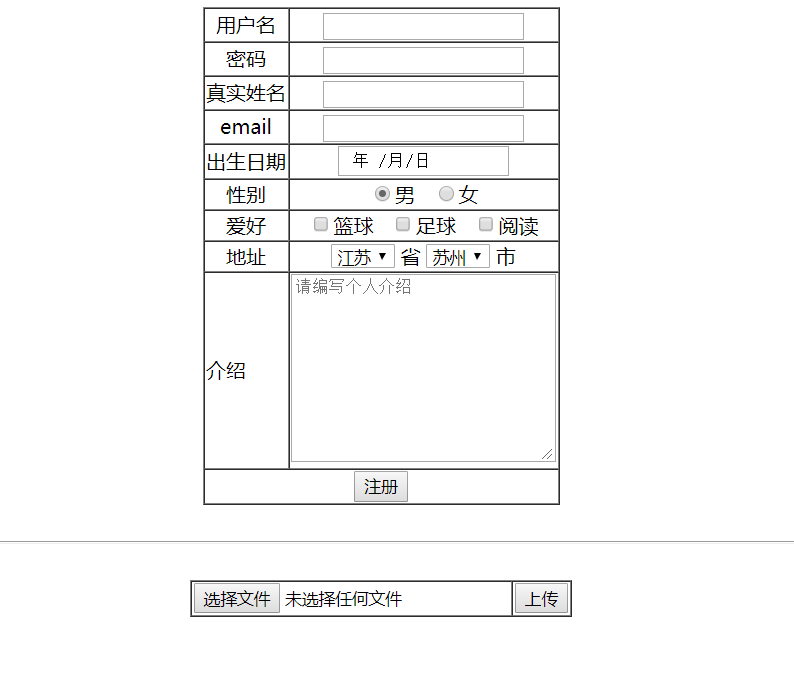
举例代码运行结果